


Choosing an email marketing platform can be challenging, especially when you need more than a tool for sending newsletters. Small businesses, online stores, creators, and growing marketing teams may also need contact management, automated emails, customer relationship management (CRM), and campaign analytics—all without managing several separate subscriptions.
Brevo is an all-in-one customer engagement platform that brings together email marketing, SMS campaigns, automation, transactional messaging, and sales tools. It offers a free plan and several paid options, allowing businesses to start with basic email campaigns and upgrade as their needs grow.
We examine its main features, pricing, ease of use, automation capabilities, advantages, limitations, and alternatives to help you make an informed decision.
About Brevo
Brevo, formerly known as Sendinblue, is a digital marketing and customer relationship management platform designed to help businesses communicate with customers throughout their journey. Its tools support promotional email campaigns, customer follow-ups, transactional messages, contact organization, and selected sales activities.
Rather than focusing exclusively on newsletters, Brevo combines multiple communication and customer management functions in one platform. Depending on the plan, users can access features such as email templates, audience segmentation, marketing automation, landing pages, SMS, WhatsApp campaigns, and advanced reporting.
For a small business, this combination can simplify marketing operations. For example, an online store could send a welcome email to a new subscriber, follow up with a promotional campaign, and use customer information to create more relevant communications.
However, not every feature is included in every subscription. Some tools require a higher-tier plan or an additional purchase, so checking the current plan details is essential before signing up.
Overview of Brevo
Brevo
Email marketing and customer engagement software
Visit the official Brevo website ↗
Free plan
$0
Free daily email limit
300 emails
Pricing and plan details may vary. Check Brevo’s official website for current terms.
| Category | Details |
|---|---|
| Platform Type | Email marketing, automation, CRM, and customer messaging |
| Main Users | Small businesses, ecommerce stores, agencies, and marketing teams |
| Communication Channels | Email, SMS, and selected additional messaging channels |
| Automation | Available with plan-dependent limits and features |
| Sales Tools | Contact management, deal tracking, and sales pipeline features |
| Pricing Model | Free plan, paid subscriptions, and optional add-ons |
| Best Suited For | Businesses wanting several marketing tools in one platform |
What Is Brevo and How Does It Work?
Brevo helps businesses store contact information, organize audiences, create campaigns, and communicate with customers. After creating an account, users can set up their sender details, import or collect contacts with appropriate permission, and build email campaigns using the platform’s editor.
A typical workflow looks like this:
- Build an audience: Add eligible contacts or collect new subscribers through signup forms.
- Create a campaign: Write an email, select a template, and add relevant links or images.
- Choose recipients: Send to a suitable list or a more specific contact segment.
- Schedule or send: Choose a sending time and review the campaign before launch.
- Measure results: Use available reporting to evaluate engagement and improve future campaigns.
Automation can reduce repetitive work by sending messages when a contact meets a specified condition. The exact workflows available depend on your subscription.
One important consideration is consent. Businesses should use permission-based contact lists, follow applicable privacy laws, and honor unsubscribe requests rather than importing purchased or unsolicited lists.
Brevo Features and Services
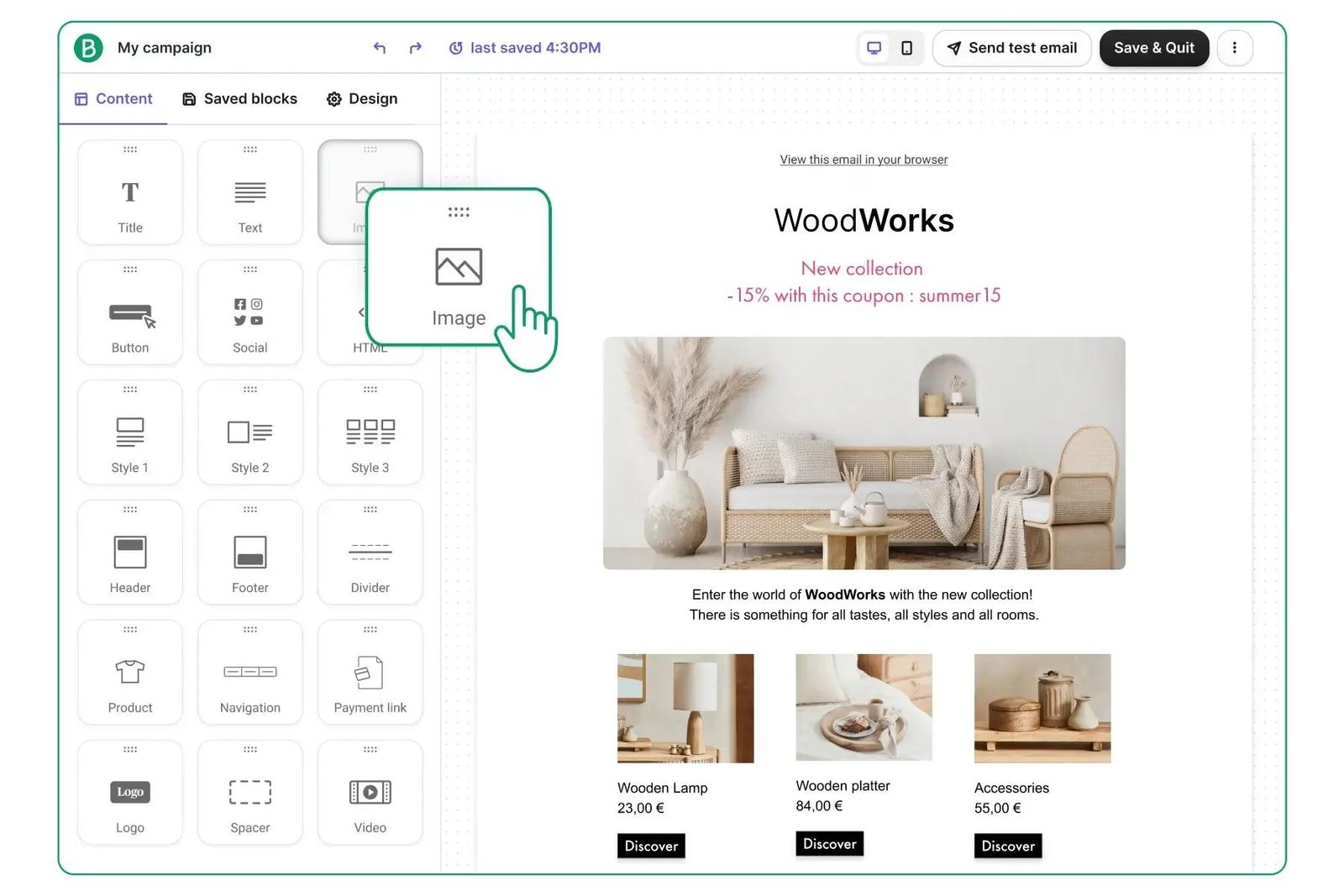
Brevo’s biggest attraction is the variety of marketing and customer communication tools available under one account. Its most useful features depend on the type of business and the plan selected.
Brevo Email Marketing Tools
Email marketing is central to Brevo. Users can create newsletters, announcements, promotional campaigns, and customer updates using the email editor and available templates.
The editor helps users arrange text, images, buttons, and other content without building every email from scratch. Responsive templates can also reduce the work required to prepare emails for different screen sizes.
For example, a small online store could send a new-product announcement, while a service provider could share a monthly newsletter or an upcoming appointment reminder.
Before sending a campaign, review the subject line, links, sender identity, and mobile layout. A visually attractive email is not enough if the message is irrelevant or difficult to read.
Brevo Marketing Automation
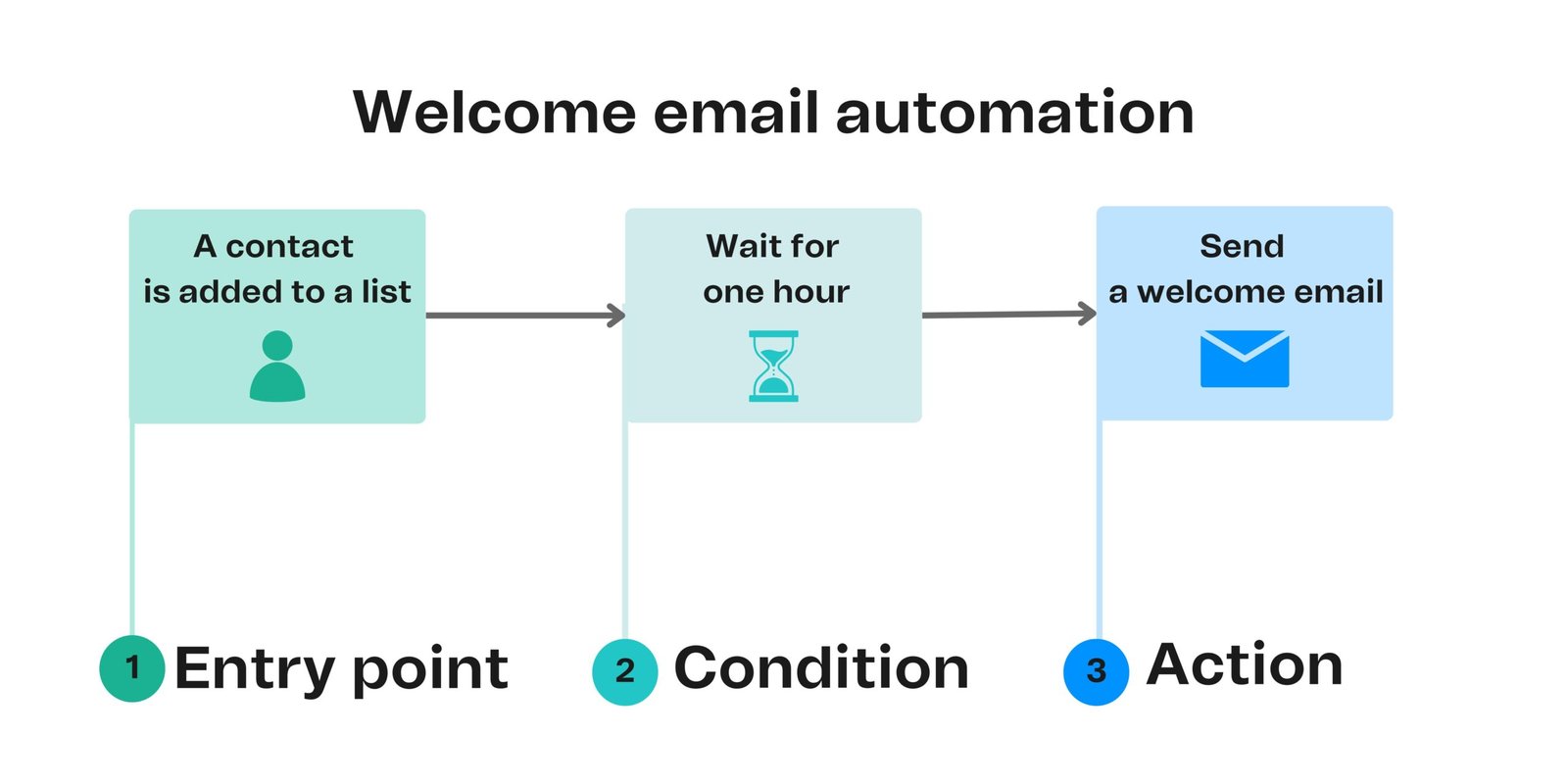
Marketing automation allows businesses to send emails based on predefined triggers and customer actions. Depending on the plan, workflows can support welcome sequences, follow-up messages, and other customer journeys.
A welcome sequence is a practical starting point. When someone subscribes to a newsletter, the business can automatically send a welcome message and follow up with useful information.
Brevo’s Free plan includes limited automation, while the Standard plan adds more extensive automation capabilities. Check the current plan comparison for exact restrictions.
Automation saves time, but it still needs monitoring. Incorrect triggers, outdated offers, or repeated messages can create a poor customer experience.
Brevo CRM and Contact Management
Brevo also provides tools to organize contacts and manage customer relationships. These capabilities can help teams keep customer information, sales opportunities, and communications in one place.
Its free sales tools include a sales pipeline and deal tracking, while more advanced functions may require a paid package.
A business that currently tracks leads in scattered spreadsheets may find a centralized CRM useful. However, companies with complex sales processes should compare Brevo’s pipeline, reporting, permissions, and integrations with those of a dedicated CRM before switching.
Brevo Email Campaign Builder
The campaign builder lets users design and prepare emails using a visual editor and reusable templates. This is particularly helpful for people who do not have a designer or developer available for every campaign.
Users should still maintain a consistent brand style, use readable fonts, include descriptive links, and make the primary action clear. Previewing and testing emails before sending can help catch formatting errors.
Brevo SMS and WhatsApp Marketing
Brevo supports SMS marketing and transactional messaging, while WhatsApp campaigns and additional messaging capabilities depend on the plan and applicable setup. Message credits may be sold separately, and costs can vary by recipient country and message type.
These channels can be useful for timely updates, delivery notifications, and customer communications. They should not be treated as interchangeable: each has its own consent requirements, pricing, and appropriate use cases.
Brevo Transactional Email Service
Transactional emails are messages associated with a specific customer action, such as an account confirmation, password reset, or order update.
Brevo offers transactional email functionality, making it relevant to businesses that need both promotional campaigns and operational messages.
Businesses should keep transactional messages clear and reliable, and distinguish them from promotional communications where required. The technical setup and deliverability needs may be more demanding for high-volume senders.
Landing Pages and Signup Forms
Signup forms help businesses collect subscriber details, while landing pages can provide a dedicated destination for a campaign or offer. Brevo’s landing-page availability varies by subscription, with the Standard plan listing one landing page.
These tools are useful for newsletter registrations, event signups, and lead-generation campaigns. Keep forms short, explain what subscribers are signing up for, and provide an appropriate privacy notice.
Integrations and Reporting
Integrations help connect Brevo with other systems used to run a business. Before committing, verify that the platform supports the specific website builder, ecommerce service, CRM, or other application you rely on.
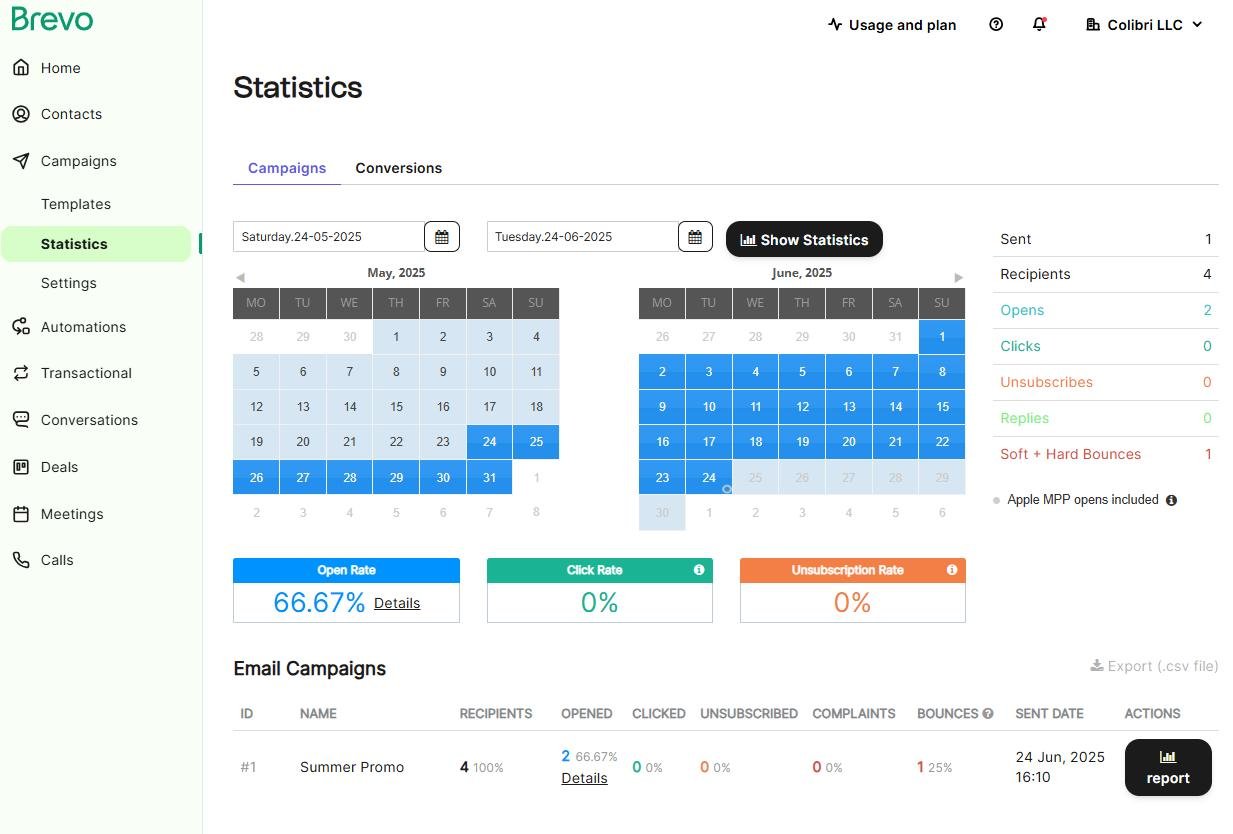
Reporting helps users assess campaign activity through metrics such as opens and clicks, with more advanced reports available on eligible plans. Remember that open rates are imperfect because privacy features and email-client behavior can affect tracking. Clicks, conversions, unsubscribes, and business outcomes can provide additional context.
Brevo Pricing Plans and Costs
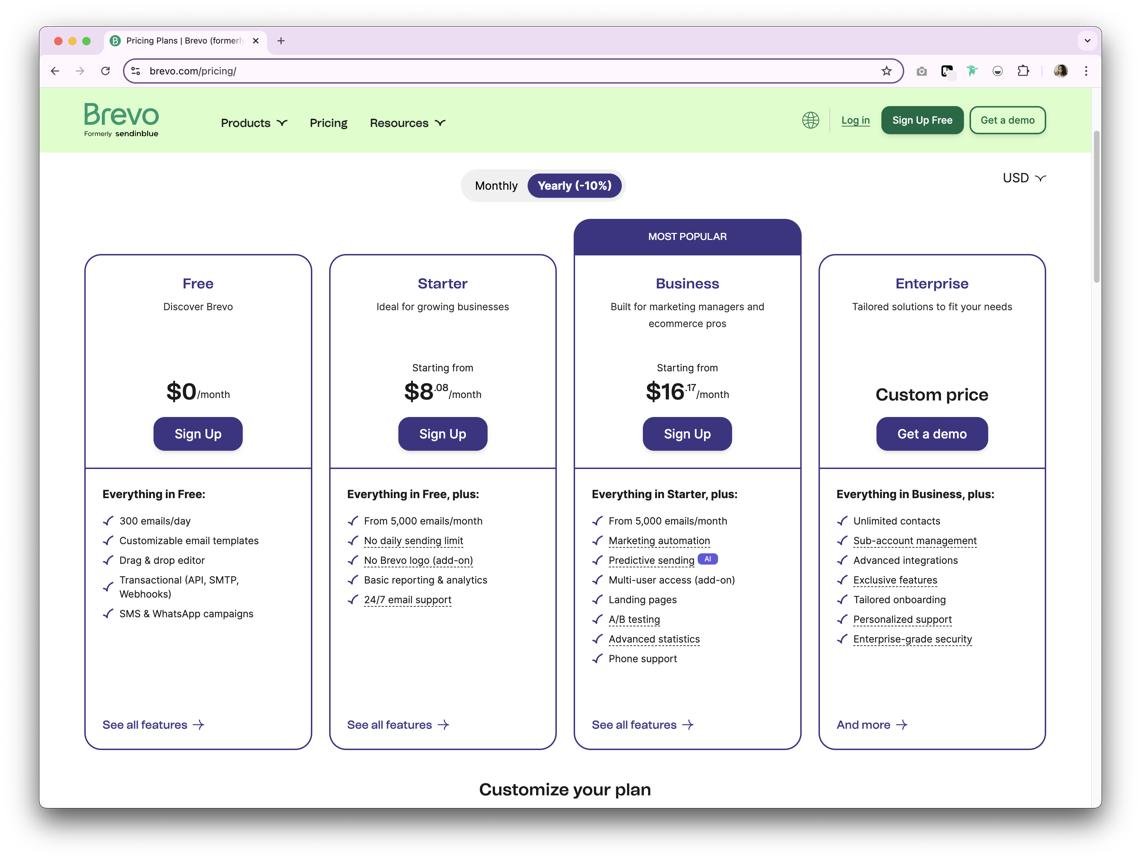
Brevo uses a tiered pricing structure, with a free option for beginners and paid plans for businesses that need more sending capacity or advanced marketing features.
The official pricing information lists the following starting prices. These are advertised starting rates, not guaranteed quotes for every business or location.
| Plan | Published Starting Price | Best For |
|---|---|---|
| Free | $0/month | Beginners testing email marketing |
| Starter | $9/month | Individuals and small businesses |
| Standard | $18/month | Growing businesses needing automation |
| Professional | $499/month | Larger teams and high-volume marketing |
| Enterprise | Custom pricing | Organizations with advanced requirements |
Prices and plan names should be checked on the official website before purchase. Taxes, billing frequency, sending volume, add-ons, and regional pricing can affect the final cost.
Brevo Free Plan: What Do You Get?
Brevo’s Free plan includes up to 300 email sends per day, storage for up to 100,000 contacts, an email editor, templates, basic reporting, and limited marketing automation. It also includes selected transactional messaging and sales features. The free plan does not require a credit card and has no fixed trial expiry according to Brevo’s published plan information.
The main limitation is that contact storage and daily sending capacity are different things. Having a large contact list does not mean you can email every contact in one day.
The Free plan is a sensible starting point if you are learning the platform, building a newsletter, or testing whether your audience responds to email marketing. It may be less suitable if you need high-volume campaigns, advanced reporting, or a fully branded experience without Brevo’s footer branding.
Brevo Starter Plan
The Starter plan begins at $9 per month in the published pricing information. It provides paid email-sending tiers and features such as email templates, segmentation, forms, and basic reporting.
It may be appropriate for a small business that has outgrown the Free plan but does not yet need advanced automation. Check the selected email volume and contact limits before subscribing, and confirm whether any optional branding-removal or sales tools add to the bill.
Brevo Standard Plan
The Standard plan starts at $18 per month and is aimed at growing businesses that need more sophisticated marketing features. Published features include marketing automation, A/B testing, advanced email reporting, send-time optimization, and a landing page.
For businesses sending campaigns regularly, these capabilities may justify the higher price. For occasional newsletters, however, a lower-tier plan could be enough.
Brevo Professional and Enterprise Plans
Professional is designed for teams with higher sending volumes and more advanced needs. Published features include additional messaging channels, multiple user seats, contact scoring, advanced ecommerce features, and more extensive analytics. The starting price listed in Brevo’s help documentation is $499 per month. Enterprise pricing is customized.
These plans are not necessary for every business. Before investing, estimate your sending volume, evaluate which features you genuinely need, and request a quote if you require enterprise capabilities.
Brevo Ease of Use: Is It Beginner-Friendly?
Brevo can be approachable for beginners because its visual email editor and templates reduce the need for coding. A new user can start with a simple newsletter, build a contact list, and learn the reporting tools before creating more complicated workflows.
However, ease of use depends on the task. Creating a basic email is different from setting up advanced automation, managing multiple customer segments, or configuring transactional email for an ecommerce website.
To get started efficiently, create one test campaign, send it to a small internal test list, check the links and layout, and review the results before moving to a larger audience.
Brevo is worth considering for beginners who want room to grow, although its more advanced tools will require some learning.
Brevo Deliverability: Do Emails Reach the Inbox?
Email deliverability is one of the most important considerations when choosing a marketing platform. Even a well-designed campaign is ineffective if it does not reach the intended recipients.
Actual inbox placement depends on several factors, including sender reputation, recipient engagement, authentication, message quality, and list hygiene. No email platform can guarantee that every message will land in the inbox.
Before launching regular campaigns, authenticate your sending domain using the records Brevo recommends, send only to appropriate contacts, remove invalid addresses, and monitor bounces, spam complaints, and unsubscribes.
If your business sends important transactional emails, test that workflow separately from promotional newsletters. A problem with one type of communication should not go unnoticed simply because the other appears to work.
Brevo Customer Support Review
Brevo’s support options vary by plan. Its published plan information lists email support for lower-tier subscriptions, priority email support for Standard, and phone support for Professional, with additional support arrangements available for Enterprise customers.
This matters if your business relies on time-sensitive campaigns or needs help troubleshooting technical integrations. A beginner running an occasional newsletter may be comfortable with email support, while a larger team may prefer more direct assistance.
Before subscribing, check the current support hours, languages, response arrangements, and whether the issue you anticipate is covered. Public customer reviews can provide useful context, but individual experiences do not guarantee the same outcome for every customer.
Brevo Security and Privacy
Brevo publishes information about privacy, security, and compliance, including support for GDPR- and CCPA-related requirements.
Still, choosing a platform does not automatically make your marketing compliant. Your business remains responsible for how it collects contact information, records consent, handles personal data, and honors data requests.
Before importing contacts, review Brevo’s acceptable-use requirements and the privacy rules applicable to your audience. Use appropriate access controls, avoid collecting unnecessary personal information, and make sure subscribers can unsubscribe easily.
Brevo Reviews: What Do Customers Think?
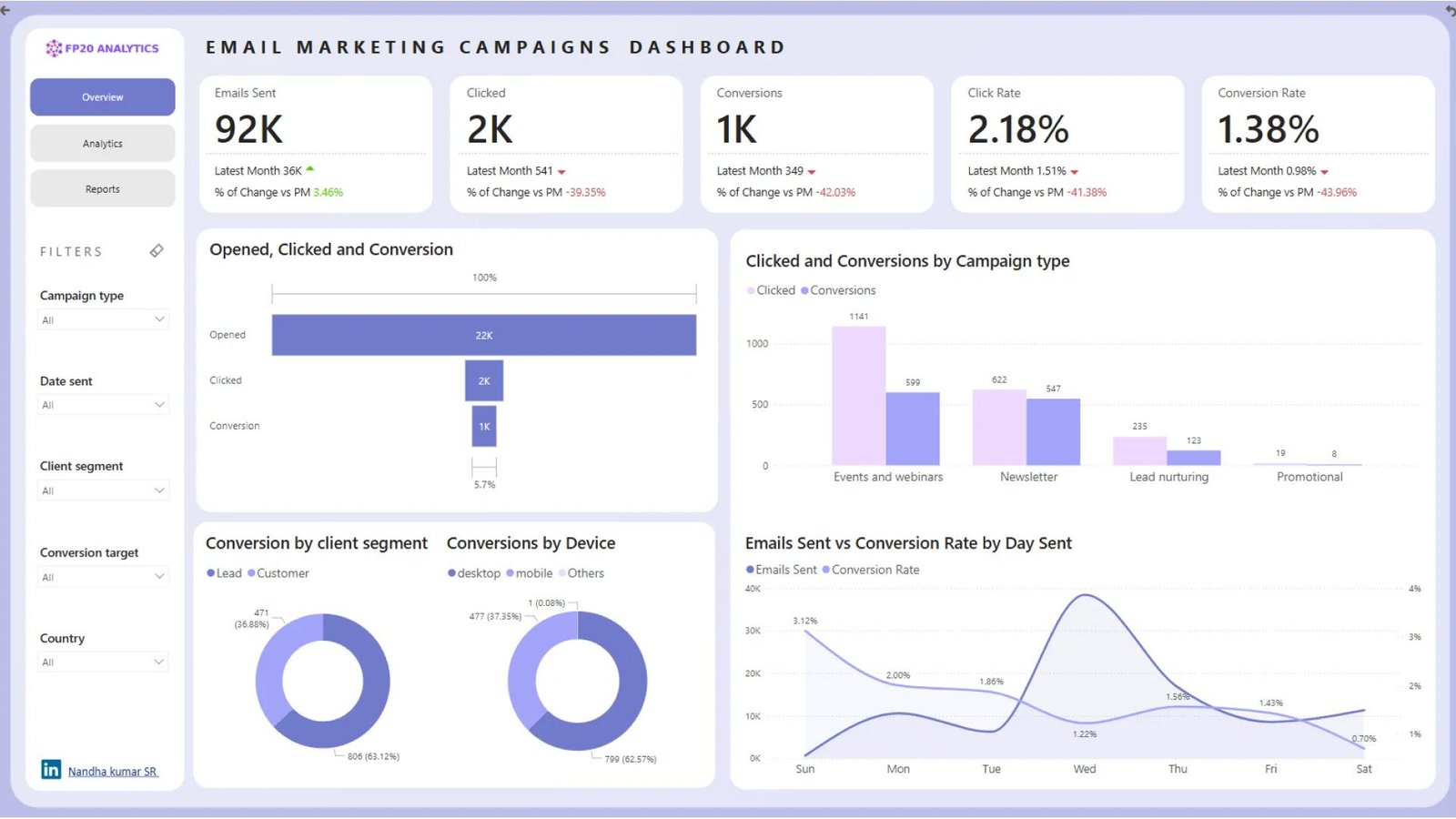
When evaluating Brevo reviews, look beyond a single star rating. Customer experiences can vary depending on business size, technical requirements, sending volume, and the type of support needed.
The most useful approach is to compare feedback about specific aspects of the platform:
- – Ease of use: Can users create campaigns and manage contacts without unnecessary complexity?
- – Features: Does the platform provide the tools customers actually need?
- – Pricing: Are sending limits, add-ons, and subscription costs easy to understand?
- – Reliability: Do campaigns and automations behave as expected?
- – Support: Are customers able to resolve account, billing, and technical problems?
A review is more helpful when it explains the situation behind the rating rather than simply saying that a service is good or bad. Look for recent, detailed feedback and compare recurring themes across independent review sources.
We also recommend testing the product yourself before making a long-term commitment. A small test campaign can help you assess the editor, reporting, and workflow more accurately than relying on ratings alone.
Brevo Pros and Cons
| Pros | Cons |
|---|---|
| Free plan available | Free sending is limited to 300 emails per day |
| Combines email marketing and selected CRM tools | Not every feature is available on every plan |
| Visual email editor and templates | Advanced capabilities can increase costs |
| Marketing automation available | Complex workflows may take time to learn |
| Supports selected multichannel communications | SMS and WhatsApp messaging may involve extra costs |
| Can suit businesses at different stages | Pricing tiers and add-ons require careful comparison |
| Reporting helps evaluate campaign activity | Tracking metrics do not tell the whole story |
Is Brevo Worth It?
Brevo can be worth it if you want to manage email marketing, contact information, and selected customer communication tools within one platform. Its free plan makes it possible to explore the service before committing to a subscription, while its paid plans provide additional capabilities as marketing requirements become more complex.
It is particularly appealing to small businesses that want to begin with newsletters and gradually add automation or CRM features.
However, it is not automatically the best choice for every company. Businesses that need highly specialized CRM functionality, advanced ecommerce automation, or a particular integration should compare alternatives before migrating their existing workflows.
Our recommendation is to start with the Free plan when it meets your needs, test the features you intend to use, and upgrade only when a specific limitation justifies the additional expense.
Who Should Use Brevo?
Brevo may be a good fit for:
- – Small businesses: Those looking for an accessible way to send newsletters and announcements.
- – Online stores: Businesses that need customer communication and selected ecommerce marketing tools.
- – Creators and publishers: People building a permission-based subscriber list.
- – Growing marketing teams: Organizations that want to introduce automation and improve campaign reporting.
- – Service providers: Businesses that benefit from combining customer communications with basic sales management.
Who Should Consider an Alternative?
Brevo may be less suitable if you need a specialized platform with very particular automation logic, advanced sales forecasting, or integrations that Brevo does not support in your required configuration.
It may also be more than you need if you only send a very occasional newsletter and prefer a simpler tool. Conversely, large organizations should assess enterprise security, permissions, support, and data requirements before making a platform-wide change.
Brevo vs. Competitors: How Does It Compare?
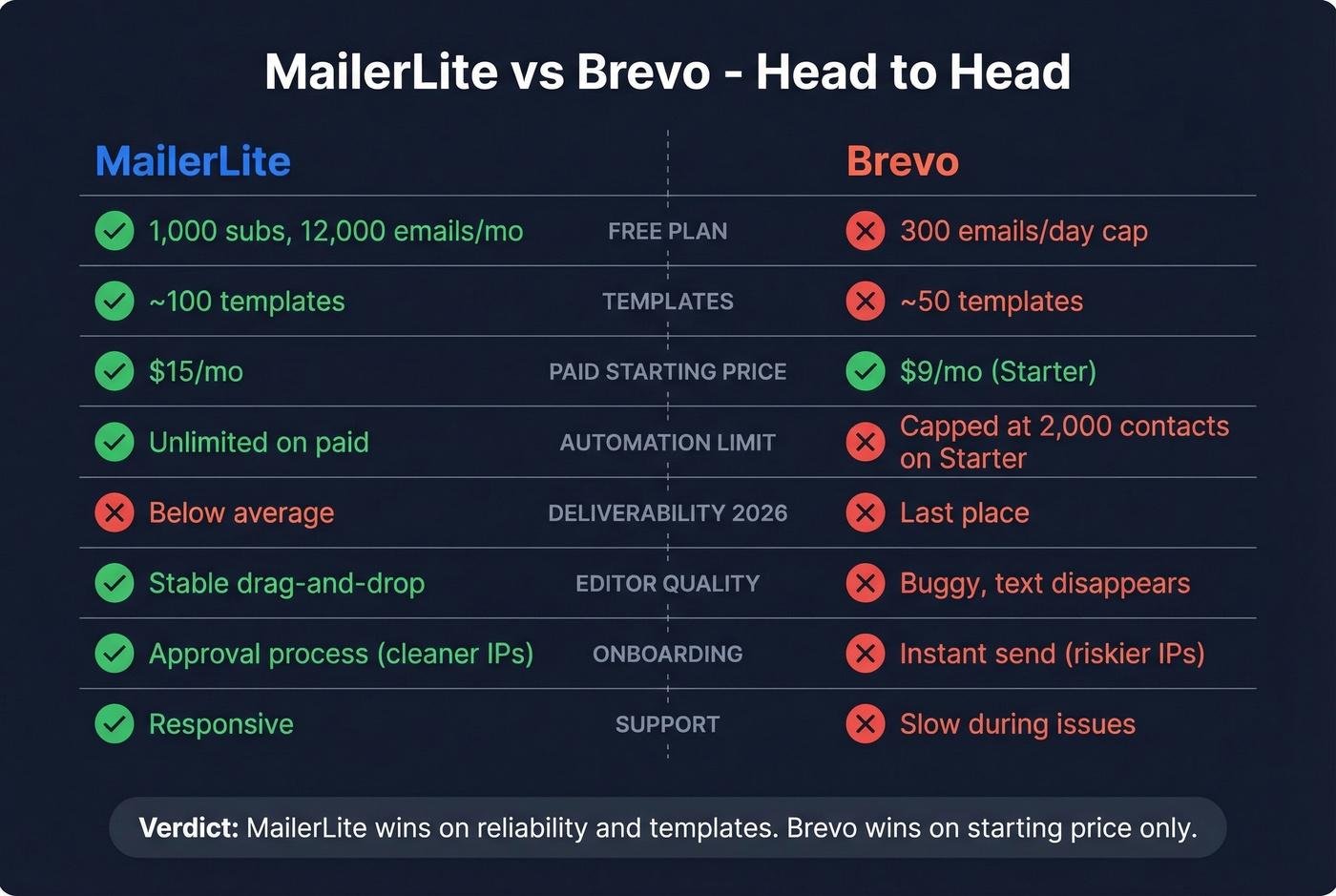
Brevo competes with email marketing platforms and broader customer engagement tools. The right choice depends on your priorities rather than brand popularity alone.
| Platform | Consider It When You Need | What to Compare |
|---|---|---|
| Brevo | Email marketing with selected CRM and multichannel tools | Sending limits, automation, and add-ons |
| Mailchimp | Email campaigns and a broader marketing toolkit | Audience-based pricing and features |
| MailerLite | Newsletter publishing and straightforward email marketing | Editor, automation, and plan limits |
| ActiveCampaign | More advanced customer journeys and automation | Workflow depth, CRM requirements, and cost |
These are general positioning comparisons, not a claim that one service is universally better. Features and prices change, so compare current plans before switching.
Brevo vs. Mailchimp
Brevo is worth considering if you want email marketing alongside selected CRM and customer messaging functions. Mailchimp is another option for businesses that want email campaigns and broader marketing tools.
Compare how each platform charges for your audience and sending volume, whether your preferred automation is included, and how easily you can migrate contacts and templates. The less expensive starting plan is not necessarily the least expensive option for your actual workload.
Brevo vs. MailerLite
MailerLite is worth evaluating if your main priority is creating newsletters, forms, and email marketing workflows without a complex setup. Brevo may appeal if you also want its wider set of customer communication and sales features.
Try the editor and automation builder in each platform before deciding. Your day-to-day workflow matters as much as the feature list.
Brevo vs. ActiveCampaign
ActiveCampaign is often considered by businesses that need sophisticated automation and customer journey management. Brevo offers a combination of email marketing, customer messaging, and selected sales features.
If automation is central to your business, test a representative workflow in both platforms. Compare branching conditions, reporting, integrations, contact management, and the total cost of the plan you would actually need.
Best Brevo Alternatives
If Brevo does not meet your requirements, consider comparing Mailchimp, MailerLite, and ActiveCampaign alongside your current tool.
Before choosing an alternative, make a short list of must-have features: monthly sending volume, automation triggers, signup forms, integrations, reporting, support, and your total budget. Check whether migration tools are available and whether you can export your contacts and other important data.
Do not choose a replacement based only on a promotional price. A platform that saves money but lacks a critical integration may create more work over time.
Brevo Promotions, Discounts, and Special Offers
Brevo offers a free plan, and its published pricing information also lists a 10% discount for yearly subscriptions compared with monthly billing.
Before paying, check the official website for any current promotions, billing options, and eligibility conditions. Do not assume a discount code is active unless it is confirmed at checkout.
You can also avoid unnecessary expenses by choosing a sending volume that matches your actual requirements and reviewing optional add-ons before subscribing.
Where to Buy Brevo
Brevo is available directly through its official website. To explore the platform, review the current plans, or create an account, visit:
Brevo Official Website
Plans, features, account registration, and product information
Visit Brevo
Buying or subscribing through the official website makes it easier to check the applicable terms, plan limits, and billing details. Review the information shown for your location before completing payment.
Brevo Return, Refund, and Cancellation Policy
Software subscriptions work differently from physical products. Rather than assuming a conventional return or exchange policy applies, review Brevo’s current terms for subscription cancellation, refunds, renewals, and any applicable exceptions.
Brevo’s published pricing information states that monthly and yearly subscriptions renew automatically unless canceled. A yearly subscription is billed upfront, so check the commitment and cancellation terms carefully before choosing it.
Before purchasing, confirm:
- – Whether your chosen subscription renews automatically.
- – When cancellation takes effect.
- – Whether any refund is available in your particular situation.
- – What happens to your access and stored data after cancellation.
- – Whether unused credits expire under your selected billing arrangement.
For the most accurate information, consult the official Brevo Help Center or contact its support team. Do not assume that canceling a subscription automatically entitles you to a refund.

Final Thoughts on Brevo
Brevo offers a practical combination of email marketing, automation, contact management, and customer communication features. Its free plan gives beginners an opportunity to explore the platform, while paid subscriptions offer additional capabilities for businesses with more demanding marketing requirements.
Its biggest advantage is the ability to bring several customer communication tasks together. Instead of immediately investing in multiple tools, a small business can start with basic email campaigns and expand its workflow when necessary.
The main consideration is pricing complexity. Sending allowances, plan-specific features, and optional add-ons can affect the total cost. Businesses should also evaluate deliverability practices, integrations, privacy responsibilities, and customer support before relying on the platform for important communications.
Brevo is worth considering for small businesses, online stores, and marketing teams that want a flexible customer engagement platform. The best way to decide is to test the Free plan, identify which features you actually need, and compare the relevant paid plan with competing services.
Conclusion
For businesses seeking email marketing alongside selected CRM and automation tools, it can be a strong option to evaluate.
It is not necessarily the right choice for everyone, particularly if you need specialized integrations, advanced CRM capabilities, or a simpler newsletter-only solution. Review the current pricing, test the workflow, and assess the total cost before committing.
Our recommendation is to choose software based on practical needs rather than the longest feature list. If Brevo’s tools match your requirements and its pricing fits your budget, it may be a worthwhile addition to your marketing setup.
FAQs
Is Brevo free to use?
Yes. Brevo offers a Free plan with up to 300 email sends per day and no fixed trial expiry, according to its published pricing information. Some advanced features require a paid subscription.
Is Brevo good for email marketing?
Brevo is worth considering for newsletters, promotional campaigns, contact segmentation, and automated messages. Its suitability depends on your sending volume, reporting needs, integrations, and budget.
Is Brevo better than Mailchimp?
Neither platform is universally better. Compare their current prices, sending limits, automation tools, integrations, and contact management features against your actual requirements.
Does Brevo offer marketing automation?
Yes. Brevo offers marketing automation, with capabilities and limits depending on the selected plan. Its Standard plan includes more extensive automation features than the basic Free plan.
Is Brevo suitable for small businesses?
It can be. Small businesses may benefit from combining email campaigns, contact management, and selected customer communication features in one platform.
Can Brevo be used as a CRM?
Yes. Brevo includes sales and contact management features, such as deal tracking and a sales pipeline. Businesses with complex CRM requirements should evaluate whether its available features meet their needs.
Does Brevo offer a free trial?
Brevo offers a Free plan rather than requiring every user to begin with a time-limited trial. Check the official website for the latest plan conditions.
Can I cancel a Brevo subscription?
Brevo subscriptions renew automatically according to their billing terms. Review the current cancellation conditions and timing in your account or the Help Center before subscribing.
Does Brevo support SMS and WhatsApp marketing?
Brevo supports SMS and offers WhatsApp messaging capabilities on eligible plans or through applicable options. Message costs and availability can vary by channel and recipient country.
Is Brevo worth it in 2026?
Brevo may be worth it if you need email marketing, automation, and selected customer relationship tools in one place. Test the Free plan and compare the cost of the features you need before upgrading.

3 Comments
Pingback: ActiveCampaign Review: Everything to Know Before Buying
Pingback: Gelato Review : Everything to Know Before Buying
Pingback: GetResponse Review: Everything to Know Before Buying