


The right email marketing platform can make a significant difference to how a business attracts subscribers, communicates with customers, and generates sales. GetResponse is an online marketing platform that combines email campaigns, marketing automation, landing pages, lead-generation tools, and features for selling digital products. But is GetResponse worth the money, and is it suitable for beginners, small businesses, and experienced marketers? In this GetResponse review, we explore its main features, pricing structure, free plan, customer feedback, advantages, limitations, and alternatives. The goal is to help you understand what the platform offers and decide whether it fits your marketing needs before committing to a paid subscription.
About GetResponse
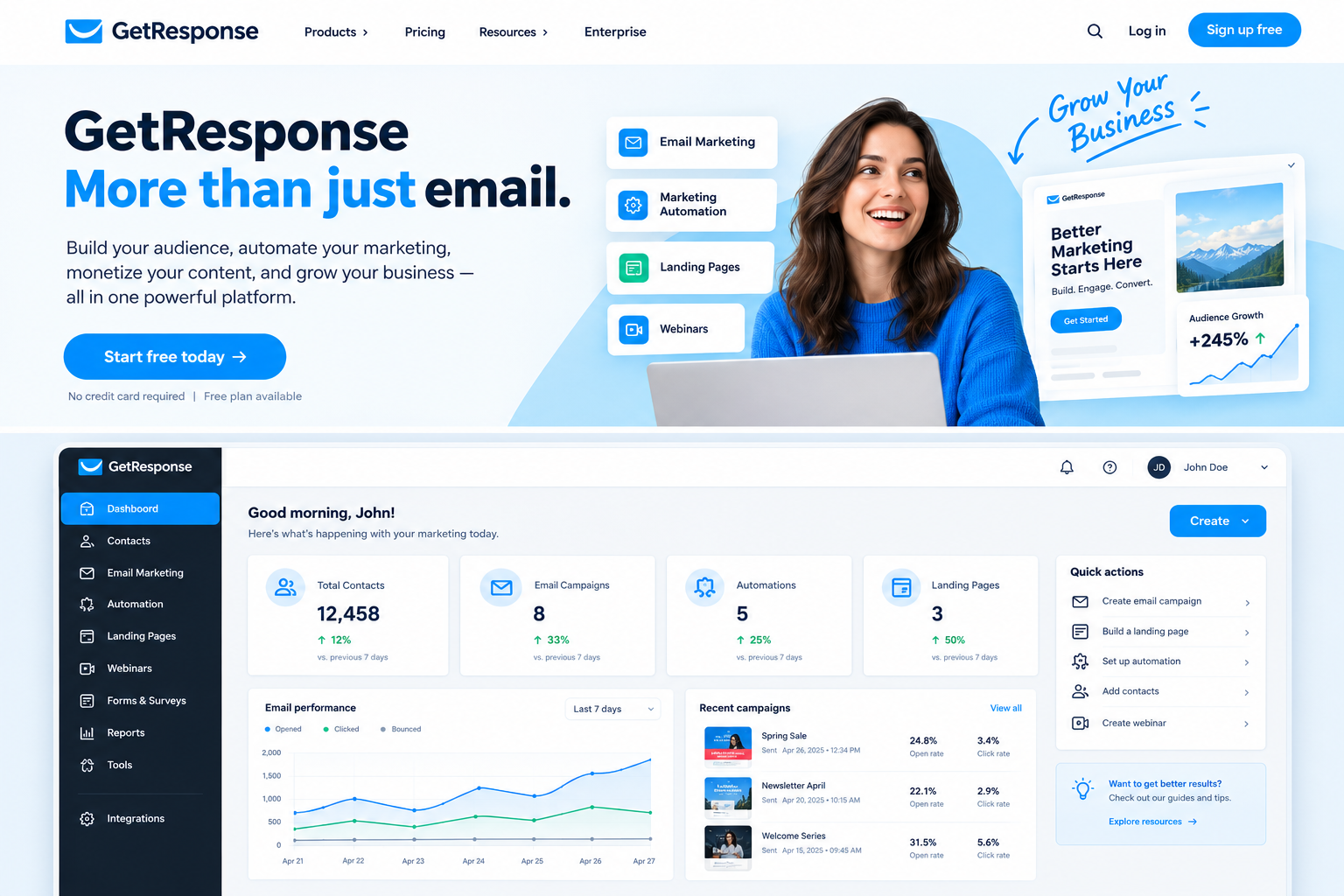
GetResponse is a marketing software company that helps businesses build email lists, communicate with subscribers, and manage digital marketing campaigns. Its platform has expanded beyond traditional newsletters to include automated customer journeys, landing pages, website tools, ecommerce marketing, webinars, and online course features on eligible plans.
These capabilities make it useful for businesses that want to manage several marketing activities from one account. Instead of purchasing separate tools for every task, users can combine selected functions within GetResponse. The company serves a range of users, from independent creators and small businesses to larger organizations. However, the best plan depends on your audience size, required features, and marketing budget.
Overview of GetResponse
GetResponse focuses on helping users attract leads, nurture subscribers, and turn audience engagement into business results. Users can create email newsletters, design signup forms, build landing pages, and automate messages based on subscriber actions. The platform also offers integrations that help businesses connect their marketing activities with other tools.
One advantage is its combination of campaign creation and automation. For example, a business can collect email addresses through a landing page and send a welcome sequence to new subscribers. More advanced users can build workflows for different customer segments. However, some capabilities depend on the subscription plan. Before signing up, identify the tasks you need most and compare the included features rather than assuming every tool is available with every account.
GetResponse Features
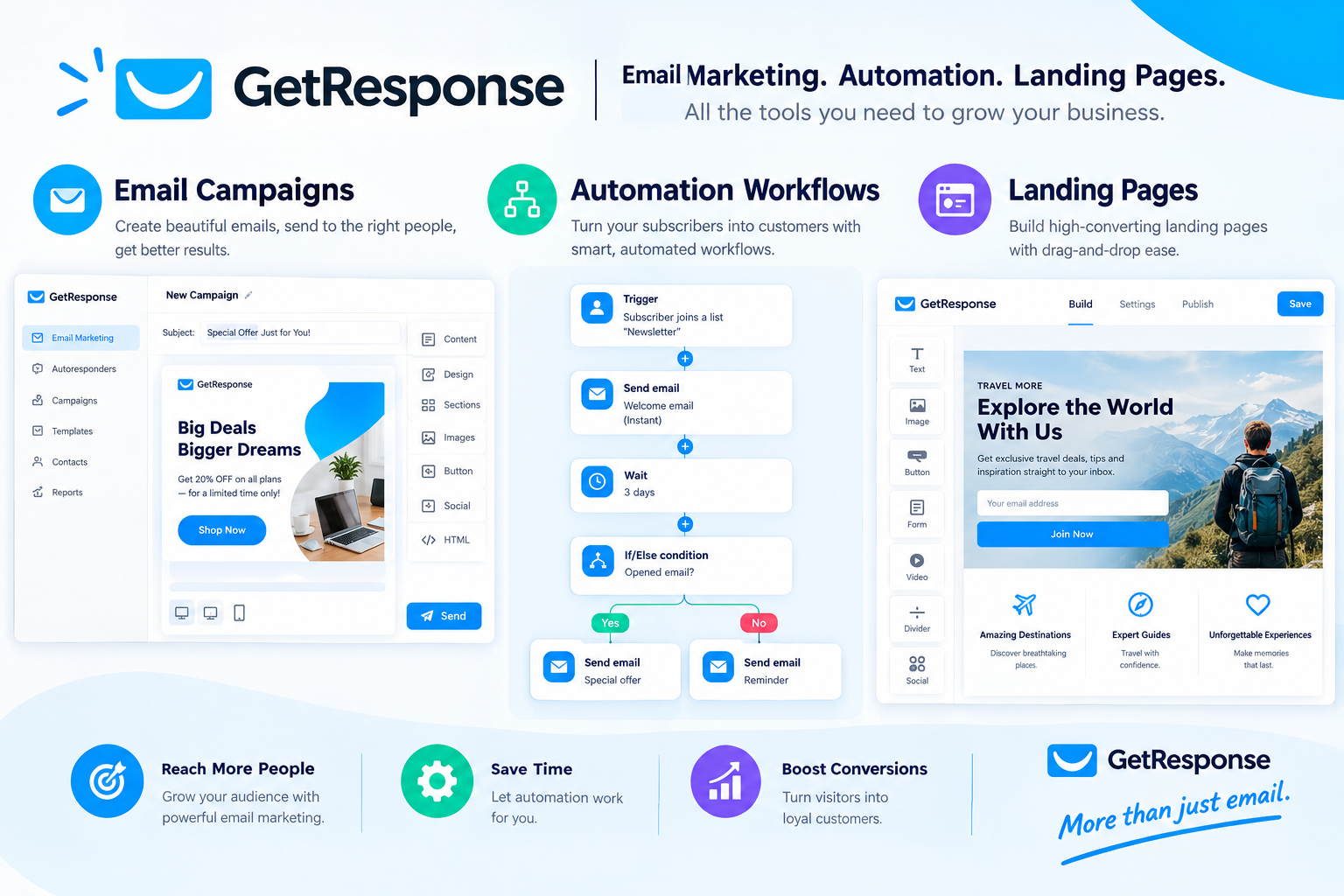
GetResponse provides a collection of tools for email marketing, lead generation, and customer communication. Its features include a drag-and-drop email editor, newsletter templates, autoresponders, contact management, landing pages, signup forms, and campaign analytics. Eligible plans also provide advanced marketing automation, ecommerce features, webinars, and tools for creating and monetizing educational content.
The main benefit is convenience: users can connect several parts of a marketing campaign without managing every task through a different platform. However, having many features can make the dashboard feel complicated for people who only want to send occasional newsletters. A practical approach is to begin with the basic tools and introduce automation as your marketing requirements grow. Always compare current plan limits before choosing a subscription.
Email Marketing and Newsletter Campaigns
Email marketing is one of GetResponse’s core functions. Users can create newsletters, promotional messages, announcements, and automated email sequences through its email editor. Templates help simplify design, while contact management tools allow businesses to organize subscribers for different campaigns. Depending on the plan, users may also have access to features such as A/B testing and advanced audience segmentation.
These tools can be useful for online stores, publishers, service providers, and creators who want to maintain regular communication with their audiences. However, successful email marketing depends on more than attractive templates. Relevant content, permission-based subscriber lists, accurate targeting, and consistent campaign measurement are essential. Before choosing GetResponse, consider how frequently you send emails and whether its available editing and reporting tools match your workflow.
GetResponse Marketing Automation Review
GetResponse marketing automation helps users create workflows that respond to subscriber actions. For example, a business might send a welcome email after someone subscribes, follow up with educational content, and deliver another message when a subscriber clicks a particular link. Automated workflows can reduce repetitive work and help businesses communicate with audiences more consistently.
The availability of automation features depends on the subscription. The Starter plan includes one automation workflow under the current plan structure, while the Marketer and Creator plans include broader automation capabilities. This distinction matters if you want to create multiple customer journeys. Automation also requires thoughtful planning: irrelevant messages or excessive follow-ups can frustrate subscribers. Before upgrading, map out your intended workflow and confirm that the plan supports the triggers, conditions, and actions you need.
GetResponse Landing Pages and Forms
GetResponse includes landing-page and signup-form tools designed to help businesses collect leads. A landing page can promote a newsletter, downloadable resource, online event, or product offer, while forms allow visitors to submit their contact information. Users can then connect those signups with email campaigns and, where supported, automated follow-ups.
These features are helpful for businesses that do not want to build every lead-generation page using a separate service. However, landing-page functionality and visitor limits vary by plan. The free account currently includes one published landing page, while paid plans offer additional capabilities. Before choosing a plan, consider how many campaigns you intend to run, whether you need custom branding, and whether you require advanced testing or analytics to improve conversion rates.
GetResponse AI Email Marketing Tools
GetResponse offers AI-assisted features designed to help users create marketing content and build campaigns more efficiently. Depending on the available tool and subscription, these capabilities can support email writing, landing-page creation, and other marketing tasks. They may be particularly useful for beginners who struggle to develop an initial draft or structure a campaign.
AI-generated content should still be reviewed before publication. Check the accuracy of product information, remove generic wording, and adjust the tone to suit your audience. Businesses should also avoid placing confidential customer information into AI tools without understanding the applicable privacy terms. Treat AI as a starting point rather than a replacement for marketing judgment. Before purchasing, verify which AI features are included in your selected plan and whether usage limits apply.
GetResponse Sales Funnels and Ecommerce Tools
GetResponse provides sales-funnel and ecommerce marketing features on eligible plans. These tools can help businesses connect lead generation, email communication, and online selling. Depending on the plan and integration, ecommerce capabilities may include abandoned-cart recovery, promotional codes, product recommendations, and revenue tracking.
For an online store, these functions can help organize communication around customer activity. For example, an eligible ecommerce workflow might remind a customer about items left in a shopping cart. However, the effectiveness of such campaigns depends on product relevance, message timing, store integration, and the quality of the underlying customer data. If ecommerce is your main priority, check the supported integrations and confirm that the plan includes the specific sales and reporting tools your store requires.
GetResponse Pricing and Plans
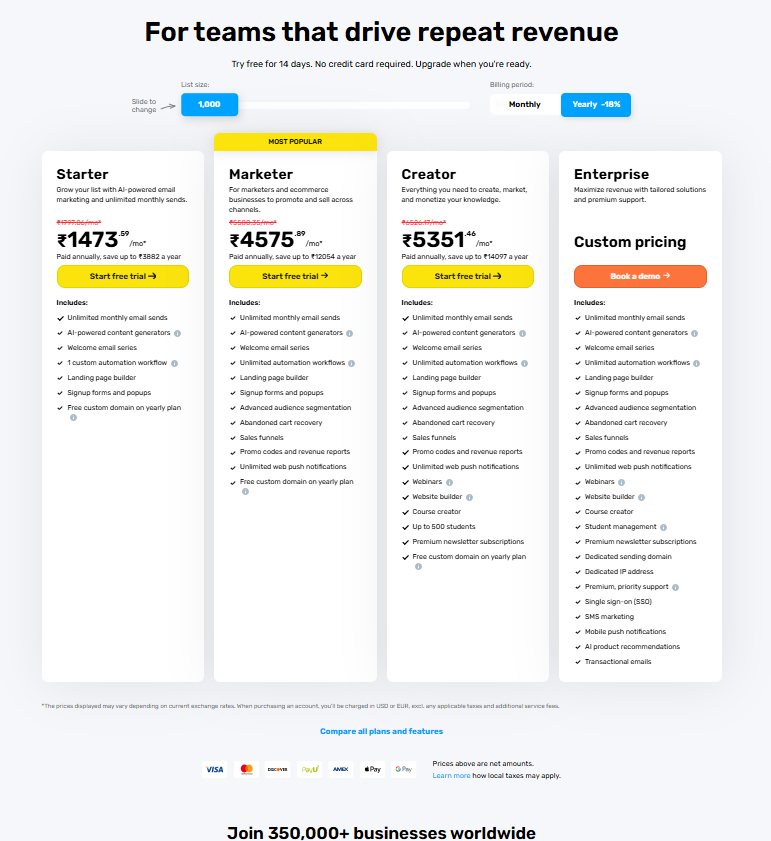
GetResponse uses a subscription model in which pricing depends on the selected plan, contact-list size, billing term, and applicable features. Its standard plan structure includes Starter, Marketer, and Creator, while larger organizations can explore customized GetResponse MAX solutions. The company also offers a free account with limited features and a 14-day period of access to selected premium capabilities.
The advertised entry price is not necessarily the amount every customer will pay. As your subscriber list grows, the cost may increase, and some tools require higher-tier plans. Annual billing may also have different effective monthly pricing from month-to-month billing. Check the official pricing page for current rates, contact limits, and exclusions before purchasing. Compare the total cost with the features you will genuinely use.
GetResponse Free Plan Review
GetResponse’s free account provides an entry point for people who want to explore email marketing without immediately paying for a subscription. The current offer includes support for up to 500 contacts, one published landing page, and up to 2,500 newsletters per month. Users can also access selected premium features during the first 14 days, subject to restrictions.
The free plan can be suitable for testing basic email campaigns, collecting leads, and learning the platform’s interface. However, it is not equivalent to a fully featured paid subscription. Some advanced functions become unavailable after the introductory period, and limitations apply to landing pages and other tools. Review the current free-plan terms before building an important campaign around a feature that may later require payment.
GetResponse Starter Plan
The Starter plan is designed for users who need core email marketing and lead-generation capabilities. Depending on the current plan terms, it includes newsletter campaigns, email editing, autoresponders, landing pages, signup forms, contact management, and basic reporting. It also supports a limited amount of automation, making it more suitable for simpler marketing workflows than complex customer journeys.
This plan may work well for freelancers, small businesses, and creators who want to build a subscriber list and send regular emails. However, users who require unlimited automation workflows, advanced ecommerce tools, or sales funnels may need to consider a higher tier. Compare the included features against your actual marketing process before subscribing, particularly if you expect to expand your campaigns in the near future.
GetResponse Marketer Plan
The Marketer plan is aimed at businesses that need more advanced campaign automation and ecommerce marketing tools. Compared with Starter, it adds broader automation capabilities, sales funnels, advanced segmentation, and selected ecommerce functions. These features can help businesses build more sophisticated customer journeys and organize campaigns around subscriber behavior.
Marketer may be worth considering if your marketing strategy involves multiple workflows, targeted follow-ups, or online-store promotions. However, not every GetResponse feature is included in this plan, so users should confirm whether they need webinars, online courses, or other Creator-specific tools. Compare the latest price at your contact-list size and evaluate the time saved through automation. Paying for advanced functionality makes sense only when those tools support a clear business objective.
GetResponse Creator Plan
The Creator plan is designed for people and businesses that want to create, promote, and monetize educational or digital content. In addition to eligible marketing and automation features, it includes tools such as webinars, online courses, paid newsletters, and website-building functionality under the current plan structure.
This combination may appeal to educators, consultants, content creators, and businesses selling knowledge-based products. It can help bring audience-building and content delivery into a more connected workflow. However, users who only need newsletters may not benefit enough from these additional capabilities to justify the cost. Before subscribing, check the current webinar limits, included team access, and monetization features. Compare the plan against the tools you already use to avoid paying for overlapping services.
GetResponse Enterprise Plan
Larger organizations with complex marketing requirements can explore GetResponse MAX, which provides customized solutions for businesses that need more advanced infrastructure and support. Depending on the agreement, enterprise features can include dedicated IP options, transactional emails, SMS marketing, advanced user management, and priority support.
This type of solution may be relevant to high-volume senders or organizations with demanding operational requirements. However, it is generally unnecessary for individuals and small businesses running straightforward newsletters. Pricing and configuration depend on the business’s needs, so interested organizations should request a demonstration and discuss their expected sending volume, integration requirements, security needs, and support expectations. A customized plan should be evaluated against measurable business requirements rather than simply choosing the highest available tier.
GetResponse Email Marketing Review
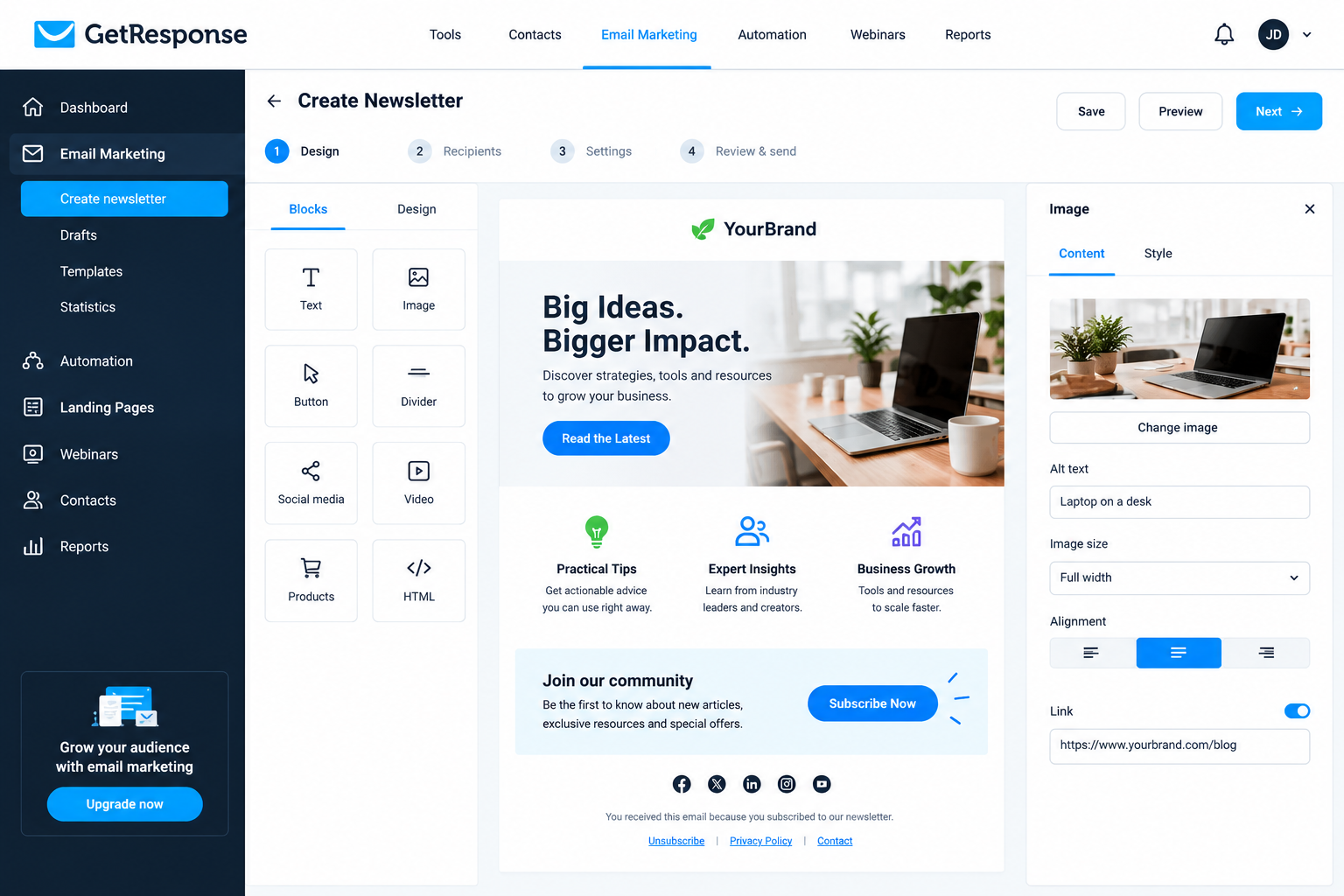
GetResponse is worth considering for businesses that want to create and manage email campaigns from one platform. Its email editor, templates, subscriber management, and reporting tools provide a foundation for newsletters and promotional communication. Users can monitor campaign performance and use available segmentation features to make messages more relevant to different audiences.
One advantage is the ability to connect email campaigns with landing pages and automation workflows. However, choosing a platform should involve more than checking its feature list. Consider how easy it is to manage contacts, design emails, analyze results, and maintain a healthy subscriber list. GetResponse may suit businesses seeking a combined marketing toolkit, while users with very basic needs might prefer a simpler service.
GetResponse Marketing Automation Review
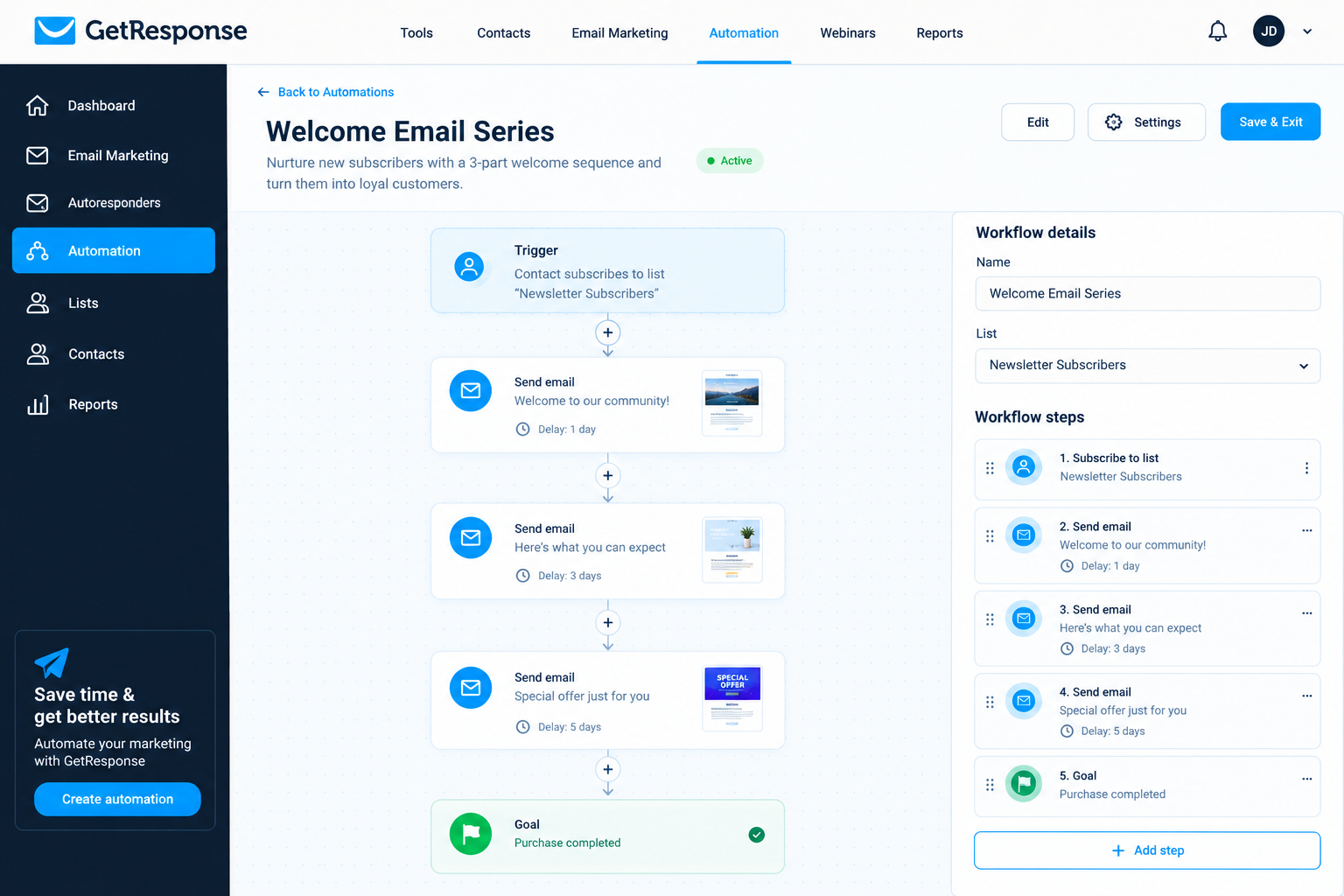
Marketing automation is one of GetResponse’s important features for businesses that want to reduce repetitive communication tasks. Users can create automated sequences for welcome emails, subscriber education, promotional follow-ups, and other customer interactions, depending on their subscription. More advanced workflows can help businesses tailor messages to subscriber behavior rather than sending identical emails to everyone.
For example, a course creator could send a welcome message after registration and follow up with useful learning resources. An online store could use supported ecommerce integrations to create relevant promotional journeys. These workflows still require planning, testing, and regular maintenance. Incorrect triggers or excessive emails can harm the customer experience. Before choosing GetResponse for automation, confirm that your preferred plan includes the workflow capacity and conditions needed for your campaign.
GetResponse Integrations and Compatibility
GetResponse supports integrations that help connect email marketing with other business tools. Depending on the available integration, users may be able to connect ecommerce platforms, analytics services, payment systems, website tools, and third-party automation services. These connections can reduce manual data entry and help businesses coordinate their marketing activities.
For example, an online store may connect its ecommerce system to support customer-focused campaigns, while a website owner may use signup forms to grow an email list. However, integration availability does not guarantee that every feature works identically across all plans. Some connections may require additional configuration or third-party services. Before subscribing, make a list of your essential tools and confirm that the integrations support your required actions, data fields, and reporting needs.
GetResponse Customer Reviews: What Do Users Think?
Public customer feedback provides useful context when evaluating GetResponse. On G2, GetResponse has a reported rating of 4.3 out of 5 from more than 1,100 reviews. Capterra also publishes customer feedback covering ease of use, customer support, features, and value for money. Ratings can change as new reviews are submitted, so check the current listings when researching the platform.
Positive feedback commonly highlights the convenience of combining email campaigns, automation, templates, and analytics in one place. Some reviewers also appreciate the interface and available support. Criticism includes concerns about pricing as subscriber lists grow and the fact that certain advanced features require higher-tier plans. Individual experiences vary, so read recent reviews from businesses similar to yours rather than relying on a single overall score.
Is GetResponse Legit and Safe to Use?
GetResponse is an established email marketing platform with an official website, published subscription terms, and product documentation. Businesses can use its tools to manage email campaigns, collect leads, and organize marketing workflows. These characteristics support evaluating it as a legitimate software service, although no platform can guarantee that every customer’s experience will be problem-free.
Before uploading contacts or purchasing a subscription, review the company’s privacy information, data-processing terms, and security documentation. Make sure your email list was collected appropriately and that your campaigns comply with applicable privacy and marketing laws. Also, check billing conditions and cancellation requirements so you understand your financial commitments. Businesses handling sensitive customer information should assess the platform’s current security controls and contractual terms before deciding whether it meets their requirements.
Is GetResponse Worth It?
GetResponse may be worth the investment for businesses that need email marketing, lead generation, and automation tools within one platform. Its higher-tier plans can also support ecommerce campaigns, webinars, and digital-content monetization. For users who currently pay for several separate services, consolidating selected activities may simplify their workflow.
Value depends on which features you actually use. A small website that sends occasional newsletters may not need advanced automation or creator tools. Additionally, subscription costs can increase with contact-list size, and some features require higher-tier plans. Start by identifying your essential requirements, testing the free account, and comparing the total cost with suitable alternatives. GetResponse is most compelling when its features solve specific marketing problems rather than simply adding more tools to your business.
GetResponse Pros and Cons
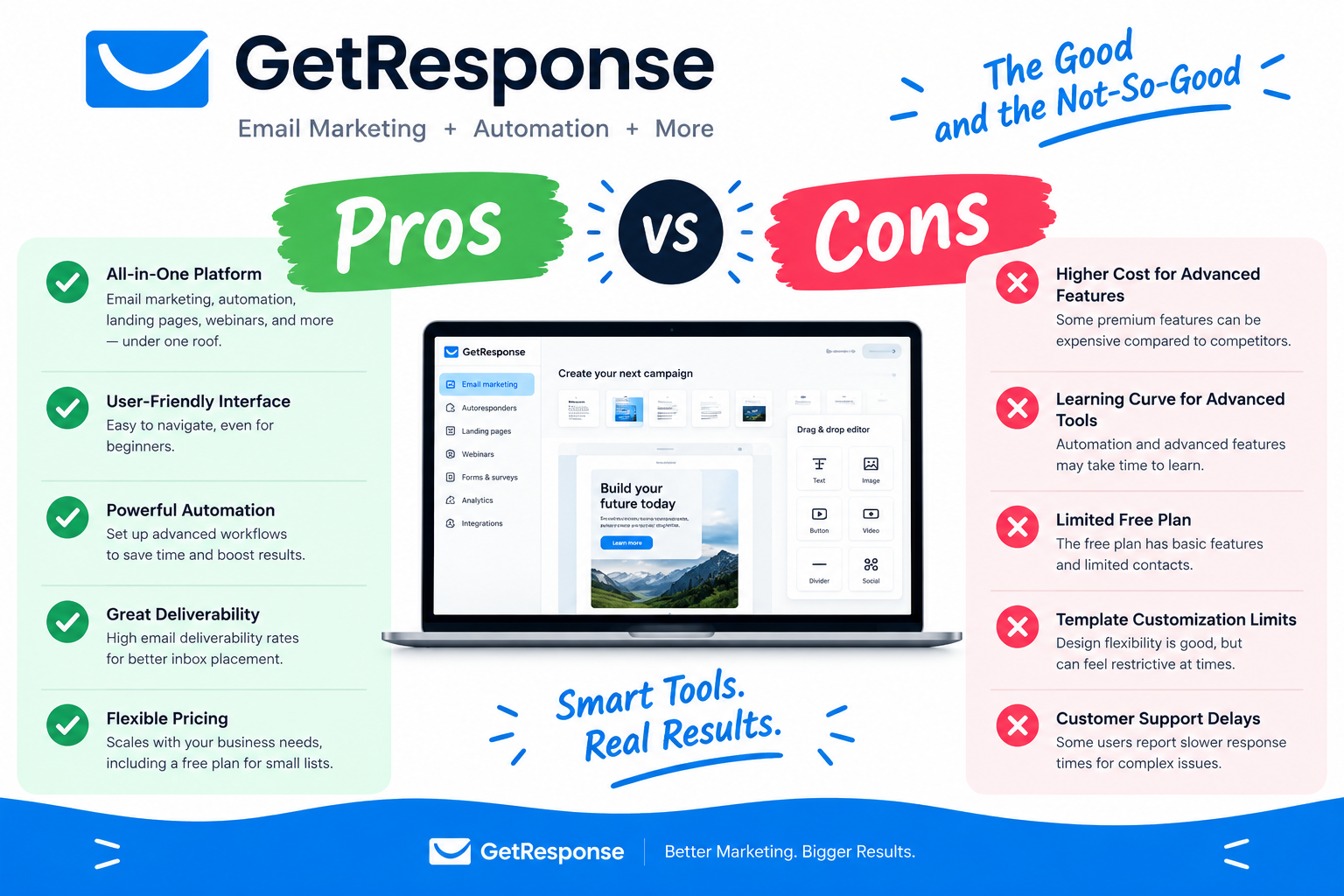
GetResponse combines several marketing functions, which can make campaign management more convenient. Nevertheless, the platform has limitations that potential customers should understand before purchasing.
Pros
- Email marketing and newsletter creation tools.
- Landing pages and lead-generation forms.
- Automation features on eligible plans.
- Contact management and campaign analytics.
- Ecommerce marketing capabilities on supported plans.
- Free account with limited features.
- Tools for webinars and online courses on eligible plans.
Cons
- Advanced capabilities require higher-tier subscriptions.
- Pricing can increase as your contact list grows.
- The broad feature set may feel complicated to beginners.
- The free plan has sending and feature limitations.
- Refunds are generally unavailable under the published policy.
- Some integrations and features may require extra setup.
Compare the available features with your actual requirements before deciding whether the platform offers good value.
GetResponse Promotions, Discounts, and Free Trial
GetResponse offers a free account that does not require a credit card for signup, along with access to selected premium features during the first 14 days. This gives prospective users an opportunity to explore the interface and test relevant marketing tools before deciding whether to upgrade. The free account remains available afterward, but premium functionality becomes limited.
Paid subscription prices and promotional offers can change. Annual billing may provide different pricing from monthly billing, so compare both options before committing. Review the billing period, contact limits, and included features carefully. Importantly, GetResponse’s published refund policy states that payments for paid subscription periods are generally non-refundable, even if the customer cancels shortly after being charged. Check the latest official terms before upgrading.
GetResponse Customer Support
Customer support is an important consideration when selecting email marketing software, particularly if you are new to automation or campaign management. GetResponse provides support options that can include live chat and email, with availability and service conditions depending on the channel and account. Its help center also contains documentation covering pricing, integrations, campaign creation, account management, and billing.
Before subscribing, check which support options are included with your selected plan and whether assistance is available in your preferred language. Businesses with complex marketing workflows may need more guidance than users who only send occasional newsletters. It is also useful to explore the documentation during the free period. This helps you judge whether the available resources are clear enough to resolve common issues without disrupting your campaigns.
GetResponse Alternatives
Although GetResponse offers a broad range of marketing features, it is sensible to compare other platforms before making a decision. Different services may be better suited to businesses with simpler newsletters, specialized ecommerce requirements, or particular automation needs.
Potential alternatives include:
- Brevo: Worth comparing if you want email marketing alongside additional customer communication tools.
- Mailchimp: An option to investigate for newsletter creation, audience management, and marketing campaigns.
- MailerLite: Worth considering if you prefer a straightforward approach to newsletters and landing pages.
- ActiveCampaign: An alternative to evaluate if advanced customer automation is a major priority.
Feature availability, contact limits, and pricing vary across these services. Compare the same subscriber count, billing term, and essential features when evaluating costs. The cheapest advertised plan is not always the least expensive option once you include the tools your business actually needs.
Who Should Use GetResponse?
GetResponse may suit small businesses, online retailers, independent creators, publishers, consultants, and marketing teams that need more than basic newsletter delivery. Its combination of email campaigns, landing pages, and automation can help users connect lead generation with ongoing customer communication. Higher-tier plans may also be useful for creators who sell courses or deliver webinars.
However, the platform may be more than necessary for someone who sends only occasional announcements to a small audience. Beginners should consider whether they need the additional features and whether they feel comfortable learning a broader marketing system. Businesses with specialized technical requirements should also verify integrations and plan limitations. The best choice is the platform that fits your workflow, budget, and growth plans without unnecessary complexity.
How to Get Started With GetResponse
Getting started with GetResponse begins with creating an account and identifying the marketing task you want to accomplish first. You might want to send a newsletter, collect leads through a landing page, or set up a welcome email sequence. Starting with one goal makes the platform easier to learn and helps you evaluate whether its tools meet your needs.
A practical setup process is to:
- Create a free account through the official website.
- Review the available features and current contact limits.
- Import only contacts you are permitted to email.
- Create a signup form or landing page if you need to collect subscribers.
- Design and proofread your first email campaign.
- Test links, forms, and automated messages before publishing.
- Monitor campaign results and adjust your approach.
Before upgrading, confirm the price, billing term, and feature limits of the plan you intend to use.
Conclusion
GetResponse is a versatile email marketing and automation platform that brings together newsletters, contact management, landing pages, and additional marketing tools. Its higher-tier subscriptions extend these capabilities to ecommerce campaigns, webinars, and online-content businesses. This broad feature set can be valuable for companies that want to coordinate several marketing activities through one service.
However, it is important to consider the cost, contact-list limits, learning curve, and differences between plans. The free account provides a useful way to explore the platform, but it does not include unrestricted access to every premium feature. Our conclusion is that GetResponse is worth considering if you need an integrated marketing toolkit and expect to use its capabilities regularly. Compare alternatives, test your essential workflows, and review the latest billing terms before making a final decision.
GetResponse Refund Policy
Before purchasing a paid subscription, it is important to understand GetResponse’s billing and cancellation terms. According to its published policy, payments for paid subscription periods are generally non-refundable, even if you cancel shortly after being charged.
Therefore, review the subscription price, billing frequency, included features, and contact limits before upgrading. If you are unsure whether the platform suits your business, consider exploring the free account first. If you decide to cancel a paid subscription,
Check the official cancellation instructions to understand when the cancellation takes effect and whether any further charges may apply. Always review the latest terms on the official GetResponse website before making a payment.
FAQs
Is GetResponse good for email marketing?
GetResponse provides newsletter creation, contact management, campaign reporting, and automation features on eligible plans. It can suit businesses that want to manage email campaigns and related marketing activities in one place.
How much does GetResponse cost?
Pricing depends on the subscription plan, contact-list size, billing term, and applicable features. Check the official pricing page for current rates rather than relying on an older price quoted in a review.
Does GetResponse offer a free plan?
Yes. The free account currently supports up to 500 contacts, one published landing page, and up to 2,500 newsletters per month. Feature and usage limits apply.
Does GetResponse have a free trial?
GetResponse offers a free account with access to selected premium features during the first 14 days. A credit card is not required to create the free account under the published offer.
Is GetResponse suitable for beginners?
It can be suitable for beginners who want email marketing and lead-generation tools. However, users may need time to learn advanced automation and other features.
Can GetResponse automate email campaigns?
Yes. GetResponse offers automation tools for creating email workflows. The number of workflows and available capabilities depend on the selected plan.
Is GetResponse worth the money?
It may be worth the cost if you use its email marketing, automation, and related features regularly. Compare the subscription cost with your requirements and available alternatives before upgrading.
What are the best GetResponse alternatives?
Brevo, Mailchimp, MailerLite, and ActiveCampaign are options worth comparing. The best alternative depends on your budget, contact-list size, automation requirements, and preferred features.
Does GetResponse provide refunds?
GetResponse’s published refund policy generally states that paid subscription charges are non-refundable. Read the latest official billing terms before purchasing.
Can I cancel my GetResponse subscription?
GetResponse allows customers to cancel their paid subscriptions. However, cancellation does not generally refund charges already made for the current billing period. Check the official cancellation instructions and terms before proceeding.
