


The right project management software can make a significant difference in how a team plans projects, manages deadlines, and communicates. Monday.com is a work management platform designed to help individuals and businesses organize tasks, monitor progress, and coordinate projects from one central workspace. However, its customizable tools, paid subscriptions, and range of products may make it difficult to decide whether it offers good value for your needs.
This Monday.com review, we explore its main features, pricing plans, automation tools, integrations, customer feedback, advantages, and limitations. We also discuss alternatives and cancellation policies to help you make an informed decision before purchasing a subscription.
About Monday.com
Monday.com is a cloud-based work management platform that helps teams organize projects, track tasks, manage workflows, and collaborate. Its customizable boards allow users to arrange information using columns, statuses, dates, owners, and other fields. Rather than relying on separate spreadsheets and disconnected tools, teams can create shared workspaces to keep important project information accessible in one place.
The company offers several products for different business needs, including Monday Work Management, Monday CRM, Monday Dev, and Monday Service. These products support activities ranging from general project planning to sales management, software development, and customer service. Monday.com may suit freelancers, growing businesses, and larger organizations, but the most appropriate product depends on team size, required features, budget, and workflow complexity.
Overview of Monday.com
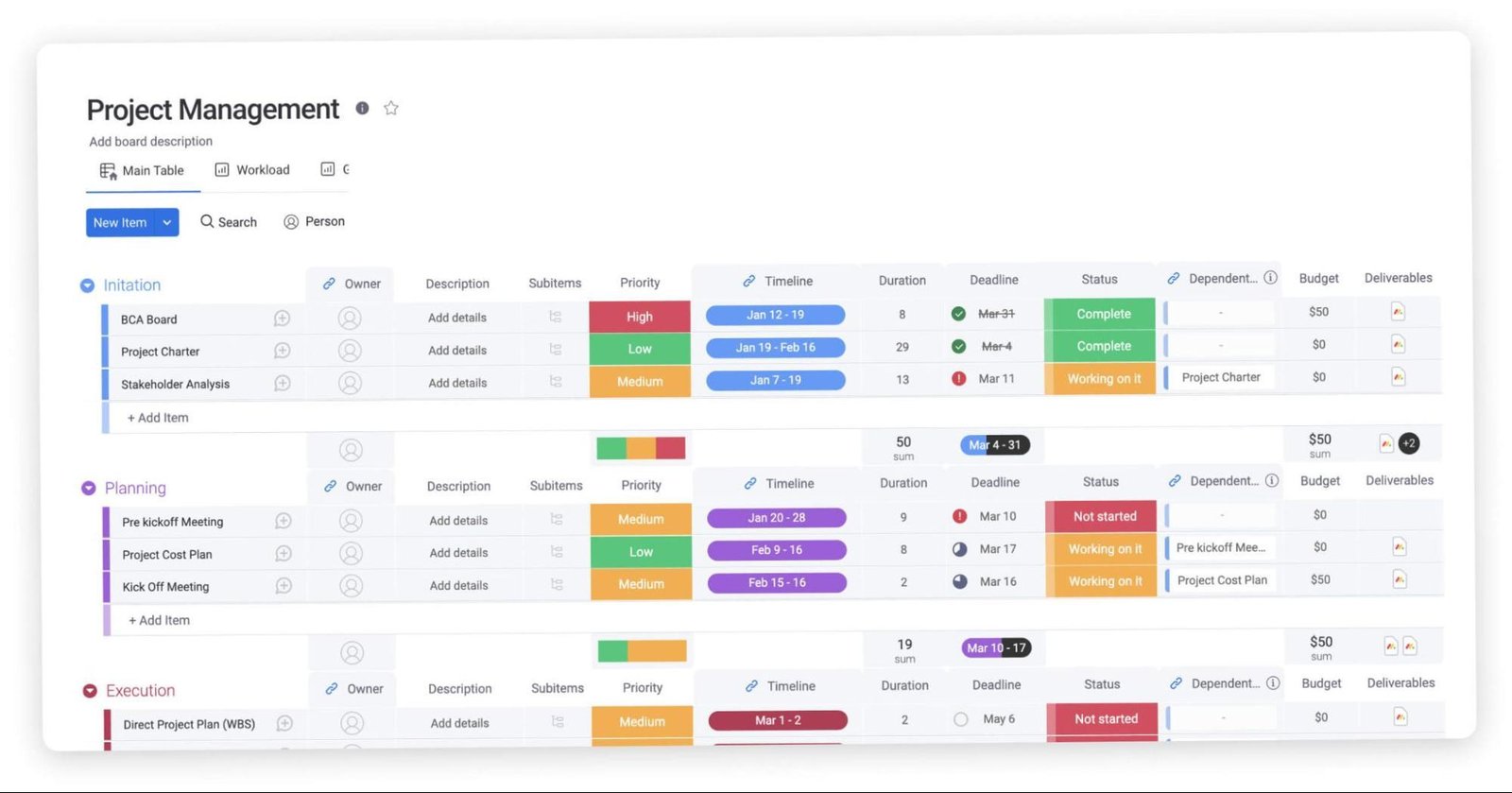
Monday.com combines visual project boards, task management, collaboration, reporting, and workflow automation in one platform. Users can create boards for individual projects, assign responsibilities, set deadlines, attach files, and monitor progress. Different views help teams organize information according to their preferred working style, while dashboards can bring information from multiple boards together where supported by the selected plan.
The platform is designed to be flexible, allowing users to adapt boards to different departments and projects. For example, a marketing team might use it to plan campaigns, while a sales team could track potential customers through a CRM pipeline. Its flexibility is a major advantage, although setting up a useful workspace may require planning. Before subscribing, check which views, integrations, automation limits, and reporting features are included in your chosen plan.
What Is Monday.com and How Does It Work?
Monday.com is an online work management tool that organizes tasks and business information into customizable boards. A board can contain items representing tasks, projects, customers, or other work. Columns provide additional information, such as status, priority, owner, and due date. Team members can update records, add comments, share files, and follow progress as work moves forward.
Users typically begin by choosing a template or creating a board from scratch. They can then invite teammates, assign tasks, establish deadlines, and build workflows. Depending on the plan, automation rules and integrations can reduce repetitive manual work. Monday.com works through a web browser and mobile apps, making it possible to access work across supported devices. Its usefulness depends on how well teams configure the platform and consistently maintain their project information.
Monday.com Features
Monday.com offers a collection of tools for planning projects, organizing information, collaborating with teammates, and monitoring results. Its feature set includes customizable boards, multiple project views, automation, integrations, dashboards, templates, and mobile access. Availability and usage limits depend on the product and subscription plan, so not every customer will have access to every capability.
The platform’s main appeal is that teams can adapt its workspace to different processes rather than follow one rigid project structure. Businesses can create workflows for content production, customer management, employee onboarding, or product development. More advanced plans may provide additional reporting, automation, and collaboration options. When evaluating Monday.com, focus on the specific features your team will use regularly rather than choosing a subscription based solely on the number of available tools.
Project Management and Task Tracking
Monday.com helps teams break larger projects into manageable tasks and monitor their progress. Users can assign work to team members, set due dates, establish priorities, and use status columns to show whether tasks are pending, in progress, or complete. Related work can be organized into boards, groups, and items, making it easier to understand project structure and responsibility.
These tools can be useful for marketing campaigns, editorial calendars, product launches, and internal business projects. Managers can review progress without repeatedly asking every team member for updates. However, a board is only as accurate as the information entered into it. Teams should agree on clear status labels, deadlines, and ownership rules before getting started. Users who need advanced project scheduling should also confirm which timeline, dependency, and workload features their selected plan supports.
Workflow Automation
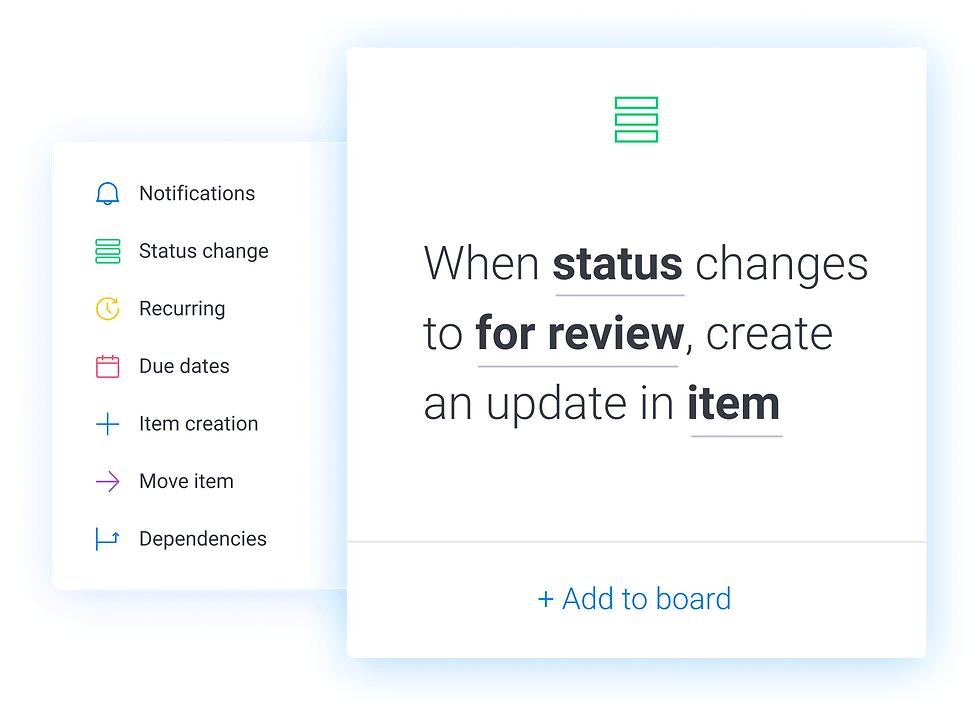
Monday.com provides automation capabilities that can help reduce repetitive administrative tasks. Depending on the available features and plan limits, users can create rules that respond to events, such as a status change or an approaching deadline. For example, a workflow might notify a teammate when a task is assigned or update a record after a specified action.
Automation can save time when a team repeatedly follows the same process. It may be especially helpful for approval workflows, recurring project steps, and lead management. However, automation availability and action limits vary by subscription, and complex rules may need careful testing. Teams should identify which manual tasks consume the most time before creating automations. Reviewing usage limits and monitoring rules after implementation can help prevent unexpected restrictions or interruptions.
Team Collaboration and Communication
Monday.com provides shared workspaces where team members can view project information, update tasks, leave comments, and attach relevant files. Keeping discussions connected to specific items can make it easier to understand decisions and find context later. Task assignments and notifications can also help people identify what requires their attention.
For distributed teams, this centralized approach may reduce confusion caused by scattered spreadsheets and separate conversations. However, Monday.com should not automatically be treated as a complete replacement for every messaging or video conferencing application. Teams may still need other communication tools for meetings and broader discussions. Before adopting the platform, consider how it will fit with existing communication habits and integrations. Establishing clear rules for comments, notifications, and file sharing can help keep the workspace useful rather than overwhelming.
Customizable Workflows and Boards
Customizable boards are among Monday.com’s core features. Users can arrange work using different column types, status labels, dates, people, numbers, and other supported fields. Templates provide a starting point, while custom boards allow teams to design workflows around their specific requirements.
A marketing department could track content from planning through publication, while a sales team might use a pipeline to follow leads and deals. This flexibility makes Monday.com suitable for a range of business processes. However, too many columns, labels, or boards can make a workspace difficult to maintain. Start with a simple structure, define what each field means, and add complexity only when needed. Before purchasing a plan, verify which board types, permissions, and customization features are available.
Time Tracking and Reporting
Monday.com provides ways to monitor project progress and visualize work, while time-tracking capabilities depend on the relevant product and subscription. Reporting tools and dashboards can help teams review task status, deadlines, workload, and other available metrics. Depending on the plan, users may be able to combine information from multiple boards to create a broader overview of operations.
These capabilities can help managers identify delays, understand resource allocation, and communicate progress to stakeholders. Nevertheless, a dashboard is only valuable when the underlying data is accurate and updated regularly. Businesses should determine which performance indicators matter before designing reports. If time tracking is essential, confirm that it is included in the chosen plan rather than assuming every subscription offers the same functionality.
Monday.com AI Features
Monday.com incorporates AI-powered capabilities into parts of its work management products. Depending on the product, plan, and current availability, these tools may assist with tasks such as summarizing information, generating or improving text, categorizing data, and supporting workflow automation. AI availability and usage limits can change, so customers should review the current feature descriptions and credit requirements before subscribing.
AI features may help teams reduce repetitive work, organize information, and speed up certain routine activities. However, generated results should be reviewed for accuracy, relevance, and completeness before they are used in important business decisions. Teams should also follow their organization’s privacy and data-handling policies when working with AI. If AI functionality is a key reason for purchasing Monday.com, confirm which capabilities are included and whether additional usage may incur extra charges.
Integrations and Third-Party Apps
Monday.com supports integrations that connect its workspaces with selected third-party applications. Depending on availability and configuration, these connections can help teams coordinate information across communication, file storage, development, and other business tools. Integrations may reduce the need to copy information manually between systems and help keep project activities connected.
Before choosing a plan, identify the applications your team already uses and verify that the required integrations are supported. Some integrations or actions may have plan-specific limits, and more complex connections may require additional setup. An integration should also be evaluated for reliability, permissions, and data-sharing requirements. Rather than connecting every available application, start with the tools that support essential daily workflows. This approach can make Monday.com easier to manage and help teams get more practical value from the platform.
Monday.com Products and Plans
Monday.com offers different products designed for distinct types of work. Monday Work Management focuses on organizing projects and general business workflows, while Monday CRM supports sales activities and customer relationships. Monday Dev is intended for software development teams, and Monday Service focuses on service operations and request management.
These products may share a similar visual approach, but their features, pricing, and intended uses are not necessarily identical. A business should select a product based on its primary workflow rather than assuming one subscription includes every Monday.com product. If your organization needs several products, compare their individual costs, access requirements, and integrations. Review the official product pages and current plan details before purchasing, particularly if you need specialized tools for sales, development, or customer support.
Monday Work Management
Monday Work Management is designed to help teams plan projects, coordinate tasks, and manage recurring business processes. Users can build boards, assign responsibilities, establish deadlines, and monitor progress through available views and dashboards. Templates can help teams create workflows for marketing calendars, operations, project launches, and other common activities.
This product may be suitable for businesses that want a shared place to organize work across departments. Its customizable structure allows teams to adapt boards to their own processes, although a clear setup is important to avoid unnecessary complexity. Before subscribing, compare the available plans for automation, integrations, dashboards, collaboration, and storage. Monday Work Management is worth considering when visibility and coordination are priorities, but the right plan depends on the number of users and the features your team actually requires.
Monday CRM
Monday CRM is designed to help businesses organize sales pipelines and customer-related activities. Teams can use it to track leads, contacts, deals, and follow-up tasks while creating workflows that reflect their sales process. Depending on the plan, available capabilities may include automation, email-related tools, dashboards, and customizable pipeline stages.
A centralized CRM can help sales teams understand which opportunities need attention and keep customer information organized. However, businesses should compare its features with their existing CRM before migrating data. Consider reporting needs, contact limits, integrations, permissions, and the cost of adding users. Monday CRM may suit teams seeking a visual and adaptable sales workspace, but organizations with specialized sales requirements should verify that the product supports their processes before committing to a subscription.
Monday Dev
Monday Dev is designed for software development teams that need to organize product work, coordinate tasks, and track development progress. Teams can use boards and workflows to manage backlogs, plan releases, monitor bugs, and coordinate work across contributors. Its project-oriented approach may also help connect development tasks with broader business objectives.
The suitability of Monday Dev depends on the team’s development practices and required technical features. Software teams should check support for their preferred tools, integrations, issue-tracking processes, reporting, and permissions. They should also evaluate whether the available workflows are suitable for their development methodology. Monday Dev may be useful for teams looking for a visual and customizable workspace, but it is important to compare it with specialized development platforms before making a final decision.
Monday Service
Monday Service focuses on organizing service operations and handling requests, incidents, or support-related workflows. Depending on the subscription, teams may have access to tools for ticket management, automation, reporting, customer portals, and other service processes. These capabilities can help service teams centralize incoming requests and monitor work through a more consistent process.
Businesses considering Monday Service should assess expected ticket volume, the number of agents, customer access requirements, and reporting needs. It is also important to check how the product integrates with existing communication and support systems. Higher-tier functionality may be necessary for advanced permissions, automation, or broader operational reporting. Monday Service may be worth considering for organizations that want adaptable service workflows, provided the chosen plan meets their operational requirements and budget.
Monday.com Pricing and Plans
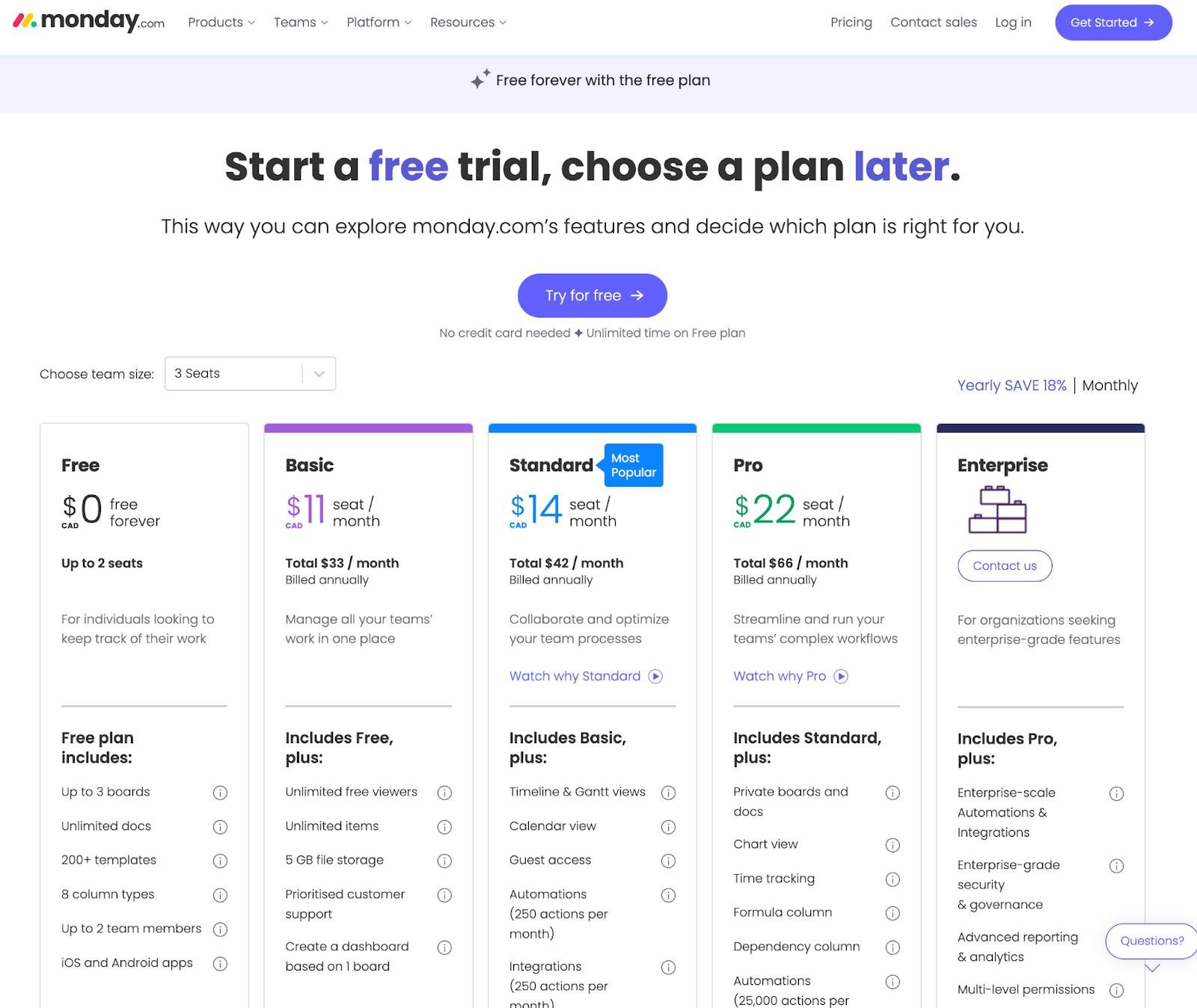
Monday.com pricing depends on the product, subscription tier, team size, billing frequency, and billing country. Its Work Management offering includes a Free plan and paid Basic, Standard, Pro, and Enterprise options. The official pricing page currently displays Basic at $9 per seat per month with annual billing in its displayed example, but the total depends on the selected seat count and applicable terms.
Do not assume that every Monday.com product has identical prices or features. Before purchasing, compare seat requirements, automation and integration limits, storage, dashboards, and support. Taxes and regional pricing may affect the final amount. The official pricing page should be treated as the source of truth at checkout because rates, promotions, and plan inclusions can change.
Free Plan
Monday.com’s Free Work Management plan is intended for individuals or very small teams that want to organize work without paying a subscription fee. The official pricing page lists up to two seats, up to three boards, up to three Docs, templates, selected column types, and mobile apps. These limits make the plan useful for exploring the platform and managing simple workflows.
However, the Free plan may not meet the needs of larger teams or businesses that require extensive automation, advanced reporting, or more sophisticated collaboration. Before relying on it for daily operations, check the current feature limits and decide whether they fit your workflow. It can be a sensible starting point for basic project organization, but teams should understand the restrictions before building a process that may later require a paid upgrade.
Basic Plan
The Basic plan adds paid functionality for teams that need more than the Free plan provides. The official pricing page currently displays a starting example of $9 per seat per month when billed annually, with the total depending on the number of seats selected. Confirm the current checkout price, seat minimums, and applicable billing conditions before purchasing.
Basic may suit teams that need a more structured workspace for managing tasks, projects, and shared information. However, businesses should not assume it includes every advanced reporting, automation, or integration feature. Compare the precise plan inclusions with your daily requirements before deciding. If your team expects to use sophisticated dashboards or extensive automated workflows, review the higher tiers as well. The best choice is the lowest-cost plan that genuinely supports your essential work.
Standard Plan
The Standard plan is designed for teams that need additional collaboration and workflow capabilities beyond the entry-level paid offering. Depending on the current plan details, it may provide additional project views, automation and integration actions, and dashboard options compared with Basic. These features can be useful for teams coordinating several projects or connecting work across different applications.
Whether Standard offers good value depends on how frequently your team will use its added capabilities. Compare the current monthly and annual prices, seat requirements, usage limits, and available features on the official pricing page. If your workflow relies on visual project planning, integrations, or cross-board reporting, this tier may be worth considering. Avoid upgrading simply because it is marketed as a popular option; select it only when the additional tools address real needs.
Pro Plan
The Pro plan is intended for teams that need more advanced work management capabilities. Depending on the current product and plan terms, features may include additional views, time-tracking functionality, more extensive automation and integration allowances, and expanded reporting options. These capabilities can be valuable for teams managing complex projects or monitoring work across multiple contributors.
The Pro plan may cost more than a small team needs. Before upgrading, identify which advanced features are essential and calculate the total subscription cost for all required seats. Check whether usage limits apply to automation, integrations, AI credits, or other services. Businesses should also evaluate whether the extra functionality will improve their existing processes enough to justify the price. A higher-tier plan is most useful when its specific capabilities solve clear operational problems.
Enterprise Plan
The Enterprise plan is designed for organizations with more complex work management, security, administration, and support requirements. Its available capabilities may include advanced governance, permissions, reporting, and enterprise-oriented support, depending on the product and agreement. Unlike publicly displayed entry-level prices, Enterprise pricing is generally customized and should be confirmed directly with Monday.com.
Large organizations should evaluate more than the headline price. Important considerations include the number of users, security requirements, data governance, integrations, onboarding, service commitments, and administrative controls. Ask for a detailed proposal explaining which features are included and whether any usage limits or additional fees apply. Enterprise may be appropriate for organizations requiring centralized administration and specialized support, but smaller teams should compare lower-tier plans before committing to a custom agreement.
Monday.com Best Features
Monday.com’s strongest appeal is its combination of customizable boards, visual project tracking, collaboration, templates, and workflow tools. Teams can create different structures for projects and processes instead of forcing every department into the same format. Progress indicators, deadlines, assignments, and available dashboards can help people understand what needs attention and where work stands.
Another useful feature is the ability to connect selected applications and automate supported actions. These tools may reduce repetitive administrative work when configured carefully. Nevertheless, feature availability varies by product and plan, so buyers should verify the details before subscribing. The best Monday.com features are those that solve specific problems for a team, such as unclear responsibilities or scattered project information. A thoughtful setup and consistent use are essential to getting meaningful value from the platform.
Monday.com Pros and Cons

Monday.com has several potential advantages, including a visual interface, customizable boards, reusable templates, collaboration tools, and workflow automation. These features can help teams centralize work and adapt processes to different projects. Its range of products also allows businesses to consider specialized solutions for sales, development, and service operations.
There are limitations to consider. The Free plan is restricted to two seats and a small number of boards, while advanced capabilities may require a more expensive subscription. Pricing can become significant as teams add users or need higher-tier features. Customization can also create complexity if workspaces are poorly organized. Before purchasing, compare the features you need against the total cost and plan restrictions. Monday.com may be a strong fit for teams seeking flexibility, but it is not automatically the best option for every budget or workflow.
Monday.com Reviews: What Do Customers Think?
Customer feedback about Monday.com should be evaluated across several sources rather than relying on a single rating or promotional testimonial. Published software reviews commonly discuss the platform’s visual interface, customization options, collaboration features, and usefulness for organizing projects. These are important strengths to investigate, but individual experiences can vary according to team size, setup, subscription level, and business needs.
Potential concerns to research include pricing as teams grow, the learning required to configure complex boards, and limitations tied to specific plans. Before publishing a customer sentiment summary, check recent reviews on independent platforms such as G2 and Capterra and note their publication dates. Do not present unverified comments as direct quotations or claim that your team personally tested the software if it did not. Readers benefit most from a balanced summary that explains both recurring praise and reported drawbacks.
Is Monday.com Easy to Use?
Monday.com is built around visual boards, recognizable status labels, and customizable columns, which can make everyday project information easier to understand. Templates may help new users get started without designing every workflow from scratch. Teams can gradually introduce more advanced features as their requirements develop, rather than configuring every option immediately.
However, ease of use depends on the complexity of the workspace. A simple task board may be straightforward, while extensive automation, multiple connected boards, and detailed reporting can require more planning. Teams should agree on naming conventions, status labels, responsibilities, and notification preferences before inviting everyone into the workspace. If possible, evaluate the product using a representative project during the available trial. This provides a more relevant basis for deciding whether the interface fits your team’s working style.
Is Monday.com Worth It?
Monday.com may be worth considering if your team needs a centralized workspace for tasks, project tracking, collaboration, and customizable workflows. Its visual boards and templates can help organize work, while eligible plans provide additional automation, integrations, and reporting capabilities. Businesses managing several projects may appreciate having a clearer overview of assignments, deadlines, and progress.
Value for money depends on your team size and required features. A small team with simple needs may find the Free plan sufficient, while advanced workflows may require a paid tier. Costs can increase when additional seats or specialized products are needed. Before subscribing, compare the annual and monthly options, check the seat requirements, and test a realistic workflow. Monday.com is most likely to provide value when its capabilities address specific problems that your current tools do not solve efficiently.
Who Should Use Monday.com?
Monday.com may be useful for small businesses, marketing teams, project managers, operations departments, and organizations coordinating work across several contributors. Its flexible boards can support content calendars, campaign planning, project delivery, onboarding, and other repeatable processes. Teams that need shared visibility into responsibilities and deadlines may particularly appreciate its visual approach.
The platform may also appeal to businesses that want to adapt workflows as their needs change. However, prospective customers should consider their budget, technical requirements, and existing software before adopting it. Organizations with strict reporting, security, or development needs should confirm that the chosen product and subscription meet those requirements. A small team may be able to start with a basic plan, while a larger organization may need more advanced capabilities. The right fit depends on the work being managed rather than company size alone.
Who Should Avoid Monday.com?
Monday.com may not be the best choice for users who only need a simple personal to-do list and do not require team collaboration or customizable workflows. A restricted Free plan may be sufficient for basic organization, but users who want unlimited flexibility without a subscription should compare other options carefully. Teams with very limited budgets should calculate the full cost before adding several paid seats.
It may also be unsuitable if your organization depends on specialized features that the selected product does not provide. Businesses should verify technical integrations, permission controls, data requirements, and reporting capabilities before migrating important work. Users who prefer a very simple interface may find extensive customization unnecessary. Rather than choosing a platform because it offers many features, select one that matches your real workflow and is practical for your team to maintain.
Monday.com Alternatives
Several project management tools may be worth comparing with Monday.com, depending on your priorities. Asana focuses on task and project coordination, Trello emphasizes visual boards and cards, and ClickUp offers a broad set of customizable work management features. Each platform has its own pricing structure, free-plan restrictions, integrations, and learning requirements.
The right alternative depends on whether you prioritize simplicity, advanced project planning, collaboration, reporting, or budget. Before switching, list the essential features you use and compare them against each provider’s current plans. Check whether the platform supports your existing integrations and whether moving your data will require additional work. A short evaluation using the same sample project in each tool can help reveal practical differences. Avoid comparing only starting prices, since user limits and feature restrictions may change the overall value.
Monday.com vs. Asana
Monday.com and Asana both help teams organize projects, assign tasks, and monitor progress, but their approaches differ. Monday.com emphasizes customizable boards and adaptable workflows, while Asana focuses on coordinating tasks, projects, responsibilities, and goals through its own project views. Both may suit teams that need shared visibility and collaboration.
The better choice depends on how your team prefers to structure work and which features are included in the relevant subscriptions. Compare project views, automation limits, reporting, integrations, guest access, and total costs for your team size. If you need highly customizable boards, Monday.com may be attractive. If your team prefers Asana’s task-oriented workflow, it may be a better fit. Test both tools with a representative project before deciding, and verify current pricing rather than relying on outdated comparisons.
Monday.com vs. Trello
Monday.com and Trello can both help teams visualize work, but they differ in scope and flexibility. Trello is widely associated with a card-and-board approach that can be easy to understand for simple workflows. Monday.com offers a broader customizable work management environment with additional options for structuring information, reporting, and coordinating processes, depending on the plan.
Trello may be suitable for individuals and teams that want a straightforward way to track tasks through stages. Monday.com may be preferable when projects require more detailed fields, dashboards, or cross-team workflows. However, actual value depends on each product’s current plan limits and integrations. Compare the number of users, automation requirements, reporting needs, and overall subscription costs. For simple task tracking, a lighter tool may be enough; more complex operations may benefit from additional customization.
Monday.com vs. ClickUp
Monday.com and ClickUp offer flexible ways to organize tasks, projects, and team workflows. Monday.com is known for its visual boards and configurable workspaces, while ClickUp provides a broad set of project and productivity features within its own workspace structure. Both platforms can serve teams looking to bring project information into one place.
When comparing them, examine the interface, available project views, integrations, automation allowances, document tools, reporting, and pricing. Feature availability can differ between plans, so compare equivalent subscriptions rather than just the advertised starting price. Monday.com may appeal to teams that prefer its visual organization, while ClickUp may suit users whose preferred workflow aligns with its feature set. Test important everyday tasks in both platforms before migrating, and consider how easily your team can maintain the chosen workspace over time.
Monday.com Promotions and Discounts
Monday.com may display promotions, annual billing savings, trial offers, or special pricing depending on the product, region, and time of purchase. These offers can change, so check the official pricing page before relying on a particular discount. Compare the promotional total with the regular subscription price and confirm how much you will pay when the offer ends or the subscription renews.
Annual billing may lower the displayed per-seat rate compared with monthly billing, but it also involves a longer commitment. Review renewal terms, seat requirements, applicable taxes, and refund eligibility before completing checkout. If your team is evaluating the software, use the available trial to confirm that essential workflows work as expected. Do not assume that a coupon or promotion applies to every product or subscription tier unless the official terms explicitly say so.
Where to Buy or Sign Up for Monday.com
The recommended place to explore Monday.com plans and start an account is its official website: https://monday.com/. From there, users can review the available products, compare subscriptions, and select the plan that matches their requirements. The official pricing page is available at https://monday.com/pricing.
Before signing up, determine how many people need access and identify the features required for everyday work. Review the current billing frequency, total cost, taxes, and plan restrictions before entering payment details. If you are considering Monday CRM, Monday Dev, or Monday Service, compare the relevant product pages rather than assuming the Work Management pricing applies. Starting with the Free plan or an available trial can help you assess usability before making a longer-term purchase.
Monday.com Customer Support
Customer support is an important consideration when choosing project management software, particularly if a team relies on the platform for daily operations. Monday.com provides online support resources, including help documentation and guides that explain product features, account administration, and billing. Support availability and service levels may vary by product and subscription tier.
Before purchasing, review the support options included in your plan and determine whether they meet your organization’s needs. Larger teams may require more structured onboarding, administration assistance, or enterprise-level support. It is also useful to explore the help center to see whether instructions are clear enough for your team to solve common problems independently. When evaluating customer feedback, check recent comments from multiple sources and distinguish recurring issues from individual experiences. Do not promise a particular response time unless it is stated in your plan or agreement.
Monday.com Security and Privacy
Security and privacy should be evaluated before storing confidential business information in any cloud-based work management platform. Monday.com provides security and administrative information through its official website and support resources. The controls available to an organization may depend on the product, subscription, configuration, and contractual terms.
Before adopting the platform, review the provider’s current security documentation, privacy policy, data-processing terms, access controls, and any compliance requirements relevant to your industry. Decide who should have permission to view, edit, or share sensitive information. Businesses should also check whether the selected plan supports their required administrative controls and governance features. Avoid assuming that every security capability is available on every tier. For regulated or sensitive workflows, consult the appropriate internal security or compliance team before moving important data into the platform.
Monday.com Cancellation and Refund Policy
Monday.com’s cancellation and refund terms depend on account status and the type of subscription. According to its official support documentation, only an account administrator can cancel an account. Eligible first-time customers may request a prorated refund for unused time on an annual plan if they submit a written request within 30 days of the initial purchase. This policy does not mean every renewal or existing subscription qualifies for a refund.
Monday.com also states that existing customers generally need to provide 30 days’ notice before the subscription end date if they want to prevent renewal at the end of the current term. Trial accounts that do not upgrade automatically deactivate after the trial ends. Review the current policy at https://support.monday.com/hc/en-us/articles/115005320069-Refund-eligibility and export important data before closing an account.
Final Thoughts
Monday.com offers a flexible environment for managing projects, tracking tasks, coordinating teams, and organizing business workflows. Its customizable boards, templates, collaboration tools, and available automation features can help teams create a shared view of their work. Multiple products also give businesses options for general work management, sales, development, and service operations.
The platform’s value depends on the subscription chosen and the complexity of your requirements. The Free plan has important limits, and more advanced features may require paid tiers. Costs should be assessed against the number of seats and the tools your team will actually use. Before purchasing, compare the current plans, review cancellation terms, and test a realistic workflow. Monday.com is worth considering for teams that value visual organization and flexibility, but it should be selected based on practical needs rather than feature count alone.
Conclusion
This Monday.com review shows why the platform may appeal to teams looking for customizable project management and work coordination software. It provides tools for organizing tasks, assigning responsibilities, tracking progress, and connecting selected workflows. Its different products can also support more specialized activities, including sales management, development, and service operations.
At the same time, prospective customers should carefully evaluate pricing, seat requirements, plan restrictions, integrations, and cancellation conditions. A Free plan or trial can be a useful way to determine whether the interface suits your workflow before making a financial commitment. Compare Monday.com with alternatives such as Asana, Trello, and ClickUp if you are unsure which tool fits best. The final decision should reflect your team’s needs, budget, and preferred working style.
Frequently Asked Questions (FAQs)
Is Monday.com Legit and Safe to Use?
Monday.com is an established work management software provider offering products for project coordination, sales, development, and service operations. Whether it is suitable for your organization depends on your security requirements, configuration, and chosen subscription. Review the official privacy and security documentation before storing confidential information, and use appropriate access controls for your workspace.
Is Monday.com Free?
Yes. Monday.com offers a Free Work Management plan. Its official pricing page lists up to two seats, up to three boards, up to three Docs, templates, and mobile apps. The plan has restrictions, so check the latest feature details before relying on it for a business workflow.
How Much Does Monday.com Cost?
Pricing varies by product, plan, seat count, billing frequency, and country. The official Work Management pricing page currently displays Basic at $9 per seat per month in its annual-billing example. Check the live pricing page for your actual team size and confirm the total at checkout.
Does Monday.com Offer a Free Trial?
Monday.com provides trial access to paid product features according to its current offer and eligibility conditions. Its support documentation says trial users do not need to provide credit card information for the described free trial, and the account deactivates if they do not upgrade. Confirm the terms shown when signing up.
Is Monday.com Good for Small Businesses?
Monday.com may suit small businesses that need to organize projects, track deadlines, and coordinate responsibilities in one place. Its customizable boards can support different business processes. However, small teams should compare the Free plan’s limits with the cost of paid seats and choose a subscription based on their actual needs.
Can Monday.com Integrate With Other Tools?
Monday.com supports selected third-party integrations, but availability and usage limits depend on the product and plan. Check the official integration directory and confirm that your essential applications are supported before purchasing. If your workflow relies on a particular connection, test it before moving important projects into the platform.
Can I Cancel My Monday.com Subscription Anytime?
Cancellation is subject to Monday.com’s current subscription terms and account requirements. Only an administrator can cancel an account, and existing customers may need to provide 30 days’ notice before the subscription end date to avoid renewal. Review the official cancellation instructions and your billing details before proceeding.
What Are the Best Alternatives to Monday.com?
Alternatives worth comparing include Asana, Trello, and ClickUp. Asana supports task and project coordination, Trello offers a visual card-based approach, and ClickUp provides a broad set of work management features. Compare current pricing, user limits, integrations, and essential capabilities to find the right fit.
Is Monday.com Worth the Money?
Monday.com may be worth the cost if its project views, collaboration tools, automation, and customization address genuine workflow problems. Teams with simple requirements may be able to use the Free plan, while advanced needs may require a paid subscription. Evaluate the total cost and test the software before committing.
